Welcome to the Financial Reporting Matrix by Profitbase
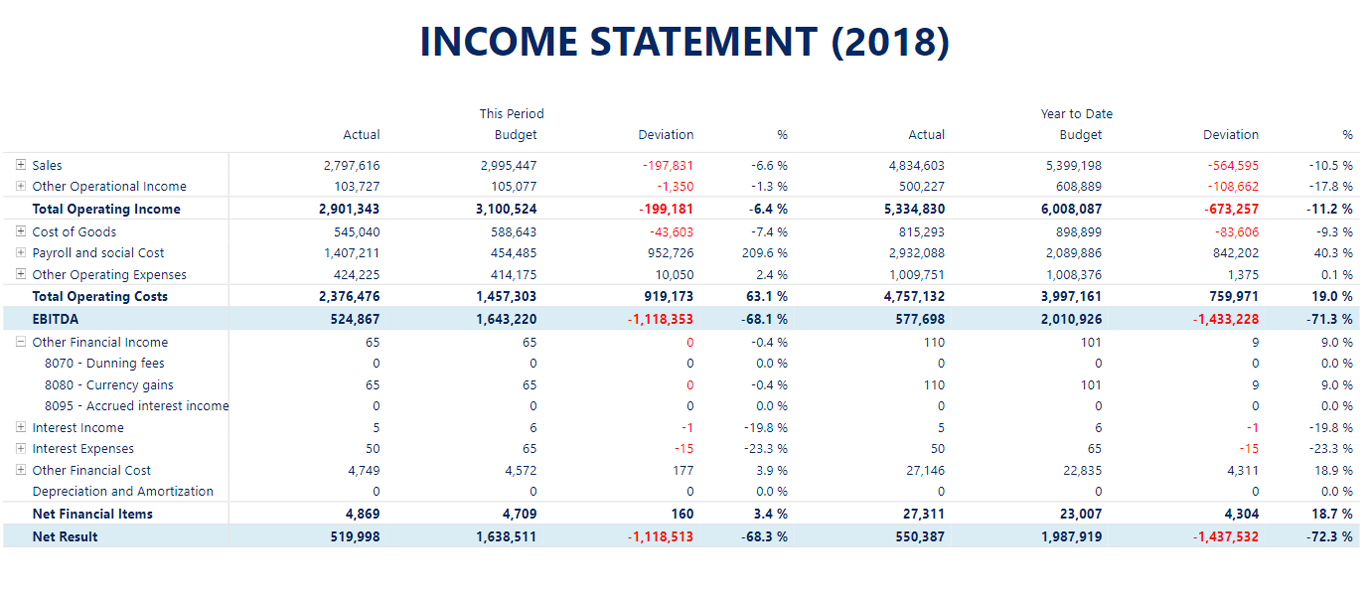
The Financial Reporting Matrix is a Power BI custom visual by Profitbase for building P&Ls, balance sheets, variance reports, and other finance-ready matrix reports — with custom columns, custom subtotals, conditional formatting, and theming.
📌 Pinned
| Getting started | Install the visual and bind your first dataset. |
| Video tutorials | Short YouTube walkthroughs. |
| FAQ | Answers to the most common questions. |
| Get help | Contact support or open a discussion. |
Categories
🏁 Getting started
| Getting started | Install the visual and bind your first dataset. |
| Get the visual | Install from AppSource or the Partner Center. |
| Use Premium features | Activate and manage Premium / paid features. |
| Video tutorials | Short YouTube walkthroughs. |
| Get help | How to contact support and open discussions. |
| Add as Organizational Visual | Deploy the visual across your Power BI tenant. |
| Find visual version | Check which version of the visual you're running. |
| Testing beta versions in Developer Mode | Try pre-release builds before they ship. |
| Data limit | Row count and dataset size limits. |
| Security | How the visual handles data and privacy. |
🗃️ Data & structure
| Adding data to the visual | Bind rows, columns, and values to your fields. |
| Measure placement | Control where measures appear in the matrix. |
| Treat columns as measures | Use a data column as if it were a measure. |
| Ragged hierarchies | Handle unbalanced hierarchies with missing levels. |
| Drill down | Enable and configure drill-down behavior. |
📑 Rows
| Row expansion (overview) | How row expand and collapse works. |
| Default expand rows | Set which rows are expanded when the report loads. |
| Expansion indent size | Control indent width per expansion level. |
| Show / hide expansion icons | Toggle the +/− icons on expandable rows. |
| Row expansion direction | Expand rows downward or upward. |
| Expanded rows auto styling | Automatically style child rows when expanded. |
| Allow or deny expansion per row | Lock specific rows from expanding. |
| Expand / Collapse all | Add a toolbar button to expand or collapse everything. |
| Stepped layout | Indented hierarchy display, similar to Excel. |
| Row grand totals | Show and style grand total rows. |
| Custom subtotals (rows) | Define subtotals that aren't based on the hierarchy. |
| Customize row styles | Per-row fonts, colors, borders, and backgrounds. |
| Update all row styles, with or without conditions | Bulk apply styles, optionally filtered by rule. |
| Update multiple rows | Bulk edit properties across several rows at once. |
| Row Options | Per-row configuration panel. |
| Hiding rows | Hide individual rows from display. |
| Hide Row and Hide Row Hierarchy | Hide a single row or an entire sub-tree. |
| Hide empty rows | Automatically hide rows where all values are empty or zero. |
| Add custom indent | Manually add extra indentation to specific rows. |
| Sorting rows / columns | Control default and interactive sort behavior. |
| Banded row style | Alternate row background colors for readability. |
📐 Columns
| Column styling (overview) | Overall approach to styling columns. |
| Column headers style | Style the column header row. |
| Column header grid lines | Toggle grid lines in the header row. |
| Individual column styles | Per-column fonts, colors, and alignment. |
| Column expansion (overview) | How column hierarchies expand. |
| Enable column expansion | Turn on the column expand / collapse feature. |
| Default column expansion | Set which columns are expanded by default. |
| Column subtotals | Show subtotals for column groups. |
| Row & Column totals | Configure grand totals and the total aggregation type. |
| Custom columns (overview) | Introduction to custom calculated columns. |
| Add custom columns | Create a new calculated column with a formula. |
| Styling custom columns | Appearance options specific to custom columns. |
| Hide column | Hide a specific column from display. |
| Hide Empty Columns | Automatically hide columns with no values. |
| Overriding column calculations | Replace the default aggregation for a column. |
| Pin columns | Freeze columns so they stay visible while scrolling. |
🔢 Values & formatting
| Values options (overview) | Numeric display options for cell values. |
| Scale units | Divide numbers by thousands, millions, etc. |
| Negative values formatting | Display negatives in red, in parentheses, or with a prefix. |
| Zero values format | Display zeros as blank, a dash, or another value. |
| Default formatting | Default number format applied across the visual. |
| Thousand and decimal separators | Configure separators used in numbers. |
| Formatting (overview) | Overview of formatting options. |
| Conditional formatting | Apply formatting rules based on cell values. |
| Cell formatting using Format function | Apply format strings to individual cells. |
| Invert sign factor | Flip the sign of specific rows (e.g. income-statement credits). |
🧮 Calculations & functions
| Calculations (overview) | How the formula engine works. |
| Using functions in column calculations | Call functions inside custom column formulas. |
| Operators | Arithmetic, comparison, and text operators. |
| Keywords | Reserved keywords available in formulas. |
| Logical functions | IF, AND, OR, and related logic. |
| Financial functions | Finance-specific functions such as CAGR, YoY, AMORLINC. |
| Math functions | Arithmetic and numeric functions. |
| Statistical functions | Aggregations and statistical functions. |
| Text functions | String manipulation functions. |
| Date functions | Date and time functions. |
| System functions | ARRAY, NEWID, EVAL, JsonParse / JsonStringify. |
| Row collection functions | Add, find, and inspect rows from formulas. |
| Cell and row styling functions | SETROWSTYLE and SETCELLSTYLE for conditional appearance. |
| Offset | Reference other rows, columns, or prior periods. |
| Table functions | ColumnHeader, RowHeader, Row().style, JSON-string columns. |
| Custom measures (Add measure) | Define reusable measures inside the visual. |
⚙️ Features
| Commenting | Add comments to cells. |
| Data bars | Show inline bar visualizations inside cells. |
| Export to Excel | Export the matrix contents to Excel. |
| Web URL | Turn cell contents into clickable links. |
| Applied steps | Track and replay configuration changes. |
| Copy cell value | Copy a single cell's value to the clipboard. |
| Tooltip | Configure hover tooltips. |
| Title | Configure the visual's title bar. |
🎨 Theming
| Theming (overview) | How themes work in the visual. |
| Theme template v3 | Theme JSON template, version 3 format. |
| Theme template v6 | Theme JSON template, version 6 format. |