Fortnox connection
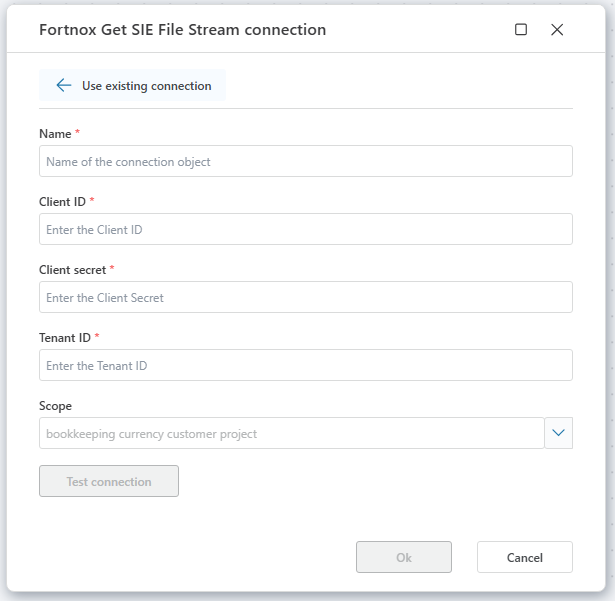
To use Fortnox actions in Hypergene Flow, you need to select an existing connection or create a new one.
The connection authorizes Flow to interact with the Fortnox REST API on your behalf. It requires authentication credentials issued for your registered client application.
Connection properties
A Fortnox connection consists of the following fields:
| Name | Description |
|---|---|
| Connection Name | A user-defined name for this connection. |
| Client ID | A unique identifier for your application registered with Fortnox. |
| Client Secret | A confidential string used for authenticating your client app. |
| Tenant ID | The identifier of the Tenant (database ID). |
| Scope | Select one or more scopes for use in requests. |
Note
A Dynamic Connection can be used to override the default connection during flow execution.
This is useful when connecting to different subscriptions programmatically or pulling credentials from external sources at runtime.
Getting Activation/Access Code
In order to use Fortnox actions and connections, You will need to activate access by getting an Access Code the first time.
- Start by clicking on Request Access
- A new tab (window) in the browser will be opened redirecting to Foortnox.
- This is the Fortnox activation page where You must login to Fortnox, select tenant, and accept scope.
- After confirmation you will be directed to an empty page (connect-microsoft.profitbase.com). Close the browser tab.
- Click on Get Access Code to get the code. You can then copy it to the clipbord and store it.