Read Content as stream
Reads a file from GitHub repository content as a Stream. Prefer using streaming over Read Content as byte array if possible. Streaming is generally faster and uses less memory, because streaming doesn't require loading the entire blob into memory before you can start working with the data.
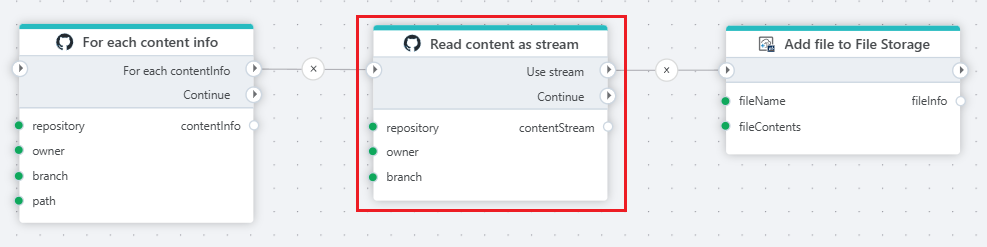
Example 
This flow iterates through content, streams the file, and uploads the file to an Hypergene InVision File Storage.
Properties
| Name | Required | Description |
|---|---|---|
| Title | No | The title of the action. |
| Authentication | No | Select an authentication token. See below. |
| Repository owner | Yes | Select or enter the repository owner. |
| Repository name | Yes | Select or enter the repository name. |
| Branch | No | Select or enter a branch name. |
| Content Path | Yes | Path to a content (file) to stream. |
| Return variable name | No | Name of the variable containing the stream. |
| Description | No | Additional notes or comments about the action or configuration. |
Limitations
GitHub limits the number of REST API requests that you can make within a specific amount of time.
You can make unauthenticated requests if you are only fetching public data. Unauthenticated requests are associated with the originating IP address, not with the user or application that made the request. The primary rate limit for unauthenticated requests is 60 requests per hour.
For authenticated users the rate limit is 5,000 requests per hour. If the installation is on a GitHub Enterprise Cloud organization, the installation has a rate limit of 15,000 requests per hour.
Authentication
Authentication is done with an authentication token. Click here for more on creating a token.
GitHub: Videos / Getting started
This section contains videos to help you get started quickly with GitHub integrations in your Flow automations.
Deploy Microsoft fabric data pipeline from GitHub
This video demonstrates how to deploy a Microsoft Fabric data pipeline from GitHub using Flow.