Connection
OAuth2 Client Credentials authentication
To connect to Hypergene Portfolios using OAuth2 Client Credentials authentication, you need to specify the application login credentials (Entra Tenant ID, Client ID and Client secret) and Portfolio ID.
Optionally, you can also specify the Domain if you are not hosted in the standard Portfolios cloud environment.
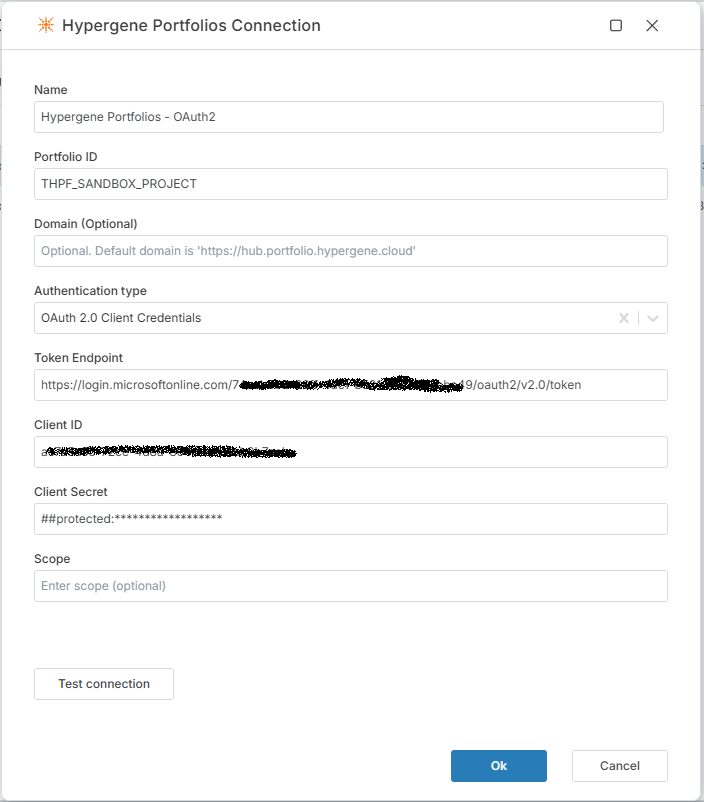
Properties
| Name | Required | Description |
|---|---|---|
| Portfolio ID | Yes | The default Portfolio ID to connect to. |
| Domain | No | Specify the domain if you are not hosted in the standard Portfolios cloud environment. The default value is 'https://hub.portfolio.hypergene.cloud'. |
| Token endpoint | Yes | The Entra ID token endpoint. This value is always https://login.microsoftonline.com/{Entra Tenant ID}/oauth2/v2.0/token. Replace Entra Tenant ID with your tenant id. |
| Client ID | Yes | The Entra ID Client ID (also sometimes referred to as as Application ID). |
| Client secret | Yes | The client secret (password) for the Entra ID Application (Client). |
| Scope | No | Optional. Default to api://e3c1fe1d-65fc-48dd-ad12a948b6f6d4d1/.default if not specified. |
Basic authentication (legacy)
To connect to Hypergene Portfolios using basic authentication, you need to specify your login credentials (username + password) and Portfolio ID.
Optionally, you can also specify the Domain if you are not hosted in the standard Portfolios cloud environment.
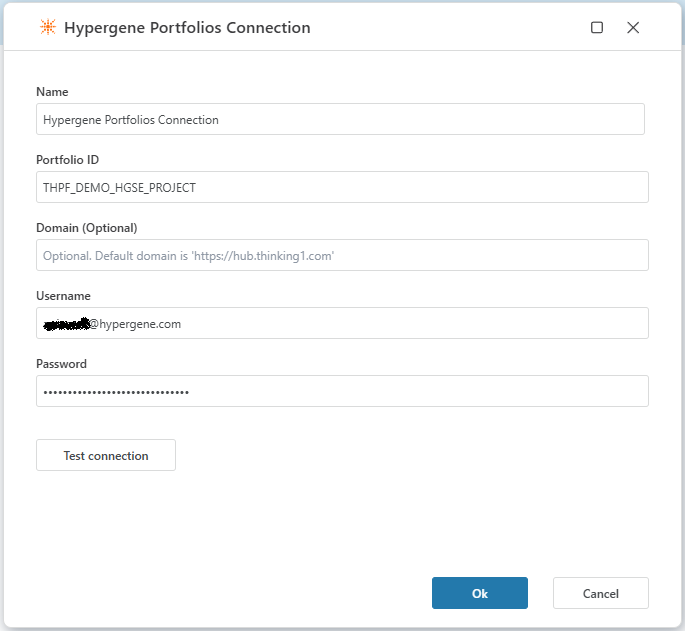
Properties
| Name | Required | Description |
|---|---|---|
| Portfolio ID | Yes | The default Portfolio ID to connect to. |
| Domain | No | Specify the domain if you are not hosted in the standard Portfolios cloud environment. The default value is 'https://hub.portfolio.hypergene.cloud'. |
| User name | Yes | The user name to authenticate with. |
| Password | Yes | The password to authenticate with. |
Description
If you are already familiar with the Portfolios HTTP API, defining a connection enables Flow to connect to the API v2 endpoint at https://hub.portfolio.hypergene.cloud/{portfolio-id}/api/v2 using the provided credentials for authentication.
If you specify a custom Domain, the address will be {domain}/{portfolio-id}/api/v2, for example https://apps.myorg.com/portfolios/{portfolio-id}/api/v2 where https://apps.myorg.com/portfolios is the custom domain.
Having a connection defined, you can then use the Get report data and Upload data actions to fetch and submit data to Portfolios.