Read file from OneDrive as stream
Reads the contents of a file in OneDrive as a stream.

Example 
This flow retrieves a list of OneDrive items (files and optionally folders) from a specified folder, identifies which of those items are Excel files, and for each Excel file reads its contents and processes the data row by row.
Properties
| Name | Required | Description |
|---|---|---|
| Connection | Yes | The connection to the OneDrive account. Setting up a connection requires a Microsoft Work or School account. |
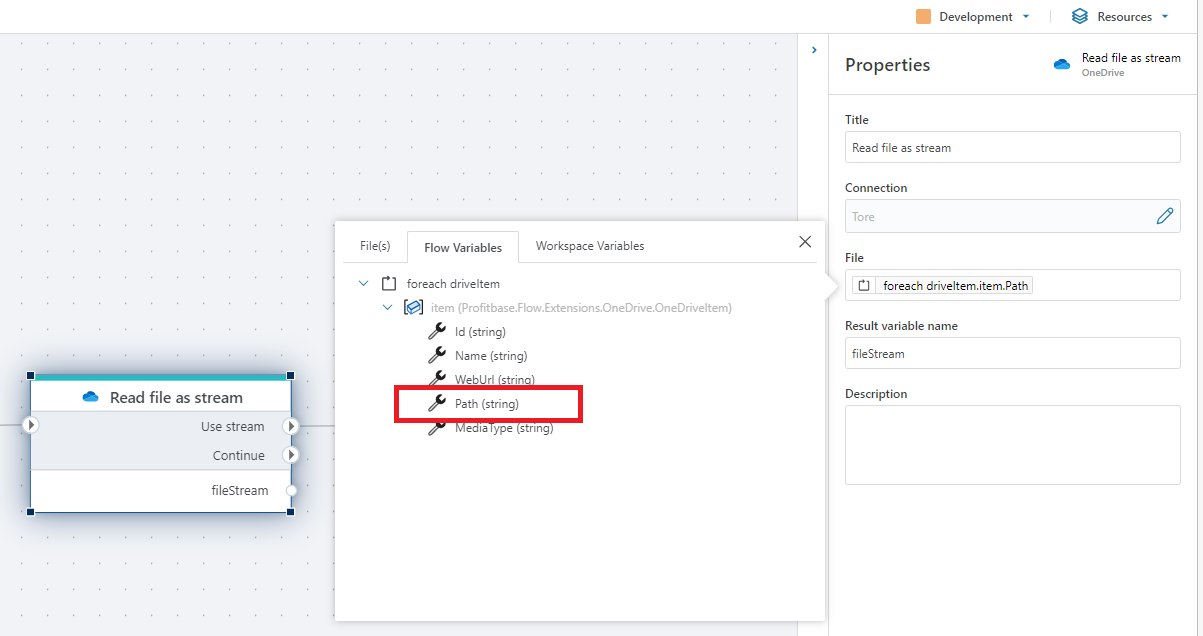
| File | Yes | The path to the file in OneDrive. When using a OneDriveItem, use the Path property like shown in the example image below. |
| Result variable name | Yes | The name of the variable containing the file stream. |
Returns
A Stream that provides access to the contents of the file. Use the stream as input to other actions, for example the Open Excel file as DataReader if you are fetching an Excel-file from OneDrive.
Note
When you want to read a file in OneDrive, you need to provide the path to the file, not the name. When using a OneDriveItem as input, select the Path property like shown below.
OneDriveItems are returned from the For each file in OneDrive and Get files in OneDrive actions.