Read Parquet file as DataTable
Loads the contents of a Parquet file into memory as a DataTable object.
Example 
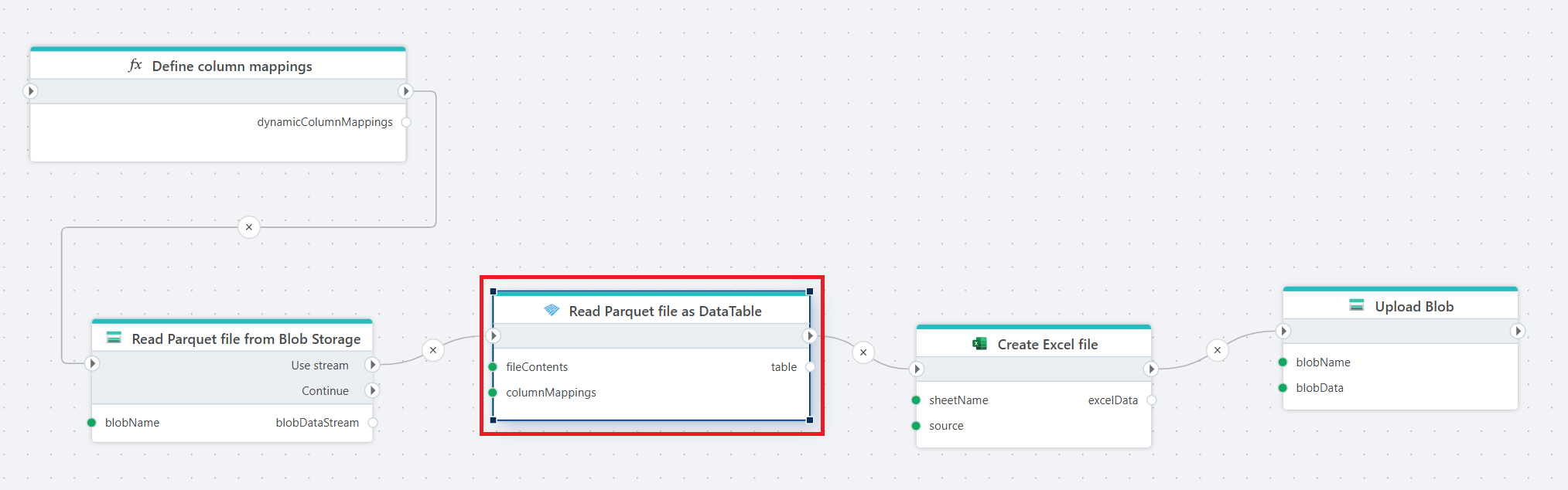
This flow reads a Parquet file from Blob Storage, applies dynamic column mappings to interpret the file structure, converts the data into an Excel file, and uploads the generated Excel file back to Blob Storage.
The flow starts with a Function that returns a list of ParquetColumnMapping definitions. These mappings dynamically define how columns in the Parquet file should be interpreted, including the target column names and data types.
Properties
| Name | Required | Description |
|---|---|---|
| Title | No | A descriptive name for the action shown in the flow. |
| File contents | Yes | The contents of the Parquet file provided as either a stream or a byte array. |
| Column mappings | No | Defines how columns in the Parquet file are mapped to the output table. You can rename columns, define their data types, or exclude columns you do not want to read. Column mappings can be defined statically or provided dynamically using a function. |
| Table variable name | Yes | The name of the DataTable variable that will store the data read from the Parquet file. |
| Disabled | No | If enabled, the action is skipped during execution. |
| Description | No | Additional notes or comments about the action configuration. |
Column mappings
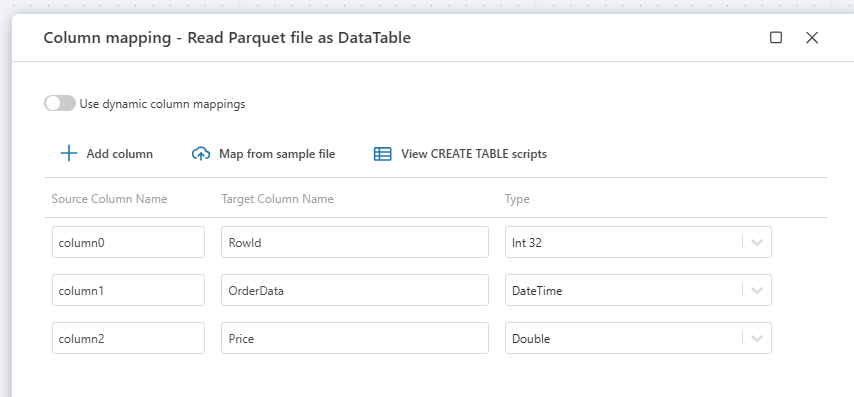
Column mappings define how columns from the Parquet file are interpreted when the file is read. A mapping lets you control the name and data type of the columns in the resulting table.
By default, the reader uses the column names and types defined in the Parquet file. If column mappings are configured, the node applies the specified mappings when creating the output table.
Each mapping defines:
- Source column – the column name in the Parquet file.
- Target column – the name of the column in the resulting DataTable.
- Data type – the data type the value should be converted to.
Column mappings can also be used to exclude columns from the output. Only the columns defined in the mapping will be included in the resulting table.
Dynamic column mapping
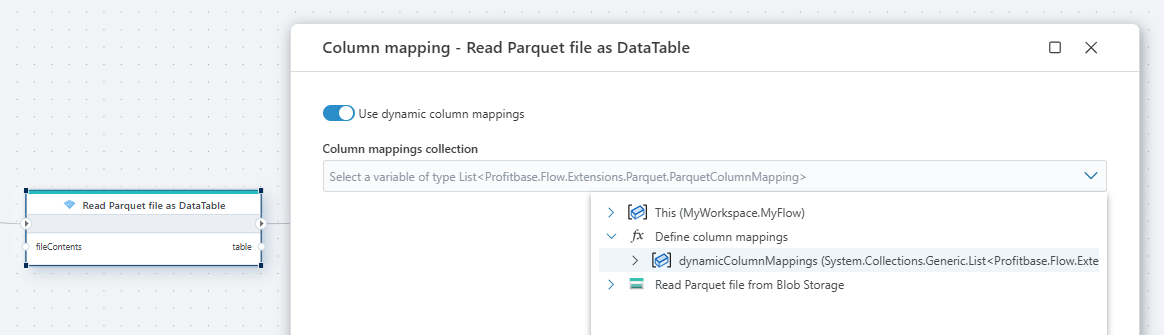
The Column mapping property allows you to control how columns from the Parquet file are interpreted when the file is read. Normally, column mappings are defined directly in the node configuration. However, you can also provide a function that returns the mappings dynamically.
When a function is supplied, the Parquet node uses the mappings returned by the function instead of static mappings defined in the UI. This enables dynamic handling of column definitions, which is useful when the structure of the input data can vary or when the same flow needs to process different schemas.
The function must return a list of ParquetColumnMapping objects. Each mapping defines:
The source column name in the Parquet file
The target column name used in the resulting table
The data type the column should be converted to
Example
private System.Collections.Generic.List<Profitbase.Flow.Extensions.Parquet.ParquetColumnMapping> GetColumnMappings()
{
    return
    [
        new ParquetColumnMapping("column0", "RowId", "int"),
        new ParquetColumnMapping("column1", "OrderDate", "DateTime"),
        new ParquetColumnMapping("column2", "Price", "double"),
        new ParquetColumnMapping("column3", "Qty", "int")
    ];
}