Popout
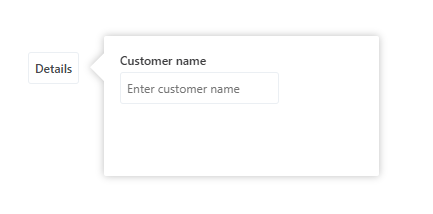
The Popout control enables showing or editing data relative to another control. For example, clicking a button can display a Popout to its right containing details about a customer or product.
Properties
| Name | Description |
|---|---|
| Name | The name of the Popout. Use the name to open or close the Popout programatically. (See example below) |
| Placement | Where to place the popup relative to the anchor element. Valid values are Above, Below, Left, Right. The default value is Below. |
| RelativeTo | The name of the anchor control that the Popout is placed relative to, for example a button that the user clicks. If this property is not set, the Popout is rendered according to its position in the DOM. |
| Width | The width of the Popout. This can be a numeric value or a percentage, for example 200 or 55%. The default value is 300 (px). |
| Height | The height of the Popout. This can be a numeric value or a percentage, for example 200 or 55%. The default value is 300 (px). |
Methods
| Name | Description |
|---|---|
| open() | Opens the Popout. |
| close() | Closes the Poput. Note that the Popout will automatically close when the user clicks outside it, or when the the ESC key is pressed. |
Example
<Function Name="showPopup">
   this.controls.myPopup.open();
</Function>
How to display a Popout
To display a Popout, you must do the following:
- Add an anchor element to the Form, for example a button. Give the button a
Name, for examplebtn_customerDetails. - Add the Popout to the Form. Give the Popout a
Name, for examplemyPopup. - Set the
RelativeToproperty of the Popup tobtn_customerDetails(the name of the anchor element). - Add a
Clickhandler (Function) to the button, and in the Function, callthis.controls.myPopup.open().
<Functions>
  	<Function Name="ShowDetails">
  		this.controls.myPopup.open();
  	</Function>
  </Functions>
  <EventHandlers />
  <UI Grid="grid">
  	<Button Name="btn_customerDetails" Text="Details" Click="ShowDetails" />
  	<Popout Name="myPopup" Width="500" Height="50%" Placement="Right" RelativeTo="btn_customerDetails">
  		<Grid Rows="auto auto 1fr" Columns="auto auto 1fr">
  			<Label Text="Customer name" Row="1"/>
  			<Input Value="{Binding Path:Customer.Name}" Row="2" Placeholder="Enter customer name" Margin="4px 0 0 0" />
  		</Grid>
  	</Popout>
  </UI>
Behavior
Some notes about the behavior of a Popout:
- When the user clicks outside the Popout, it closes automatically.
- The Popout is positioned relative to its anchor element. If the specified width or height exceeds the available space, or if the preferred placement (above, below, right, or left) is not possible, the system will attempt alternative placements. If none of the sides have enough space, the system gradually reduces the Popout’s size until it fits.
- If the
RelativeToproperty is not specified, the Popout is rendered according to its position in the DOM.