This document contains the new features and changes to the EPM Planner release 5.5.0.
This package provide the financial planning function and can be organized in processes (e.g. Forecast) and one or more versions.
The top section contains an abstract of the new features and main changes. The bottom section contains a detailed list of GitLab issues registered for this release. Items marked with "Bug" contains bug fixes.
Breaking Changes:
These are changes that is likely to cause existing configurations to present different content after upgrading a solution.
Changes:
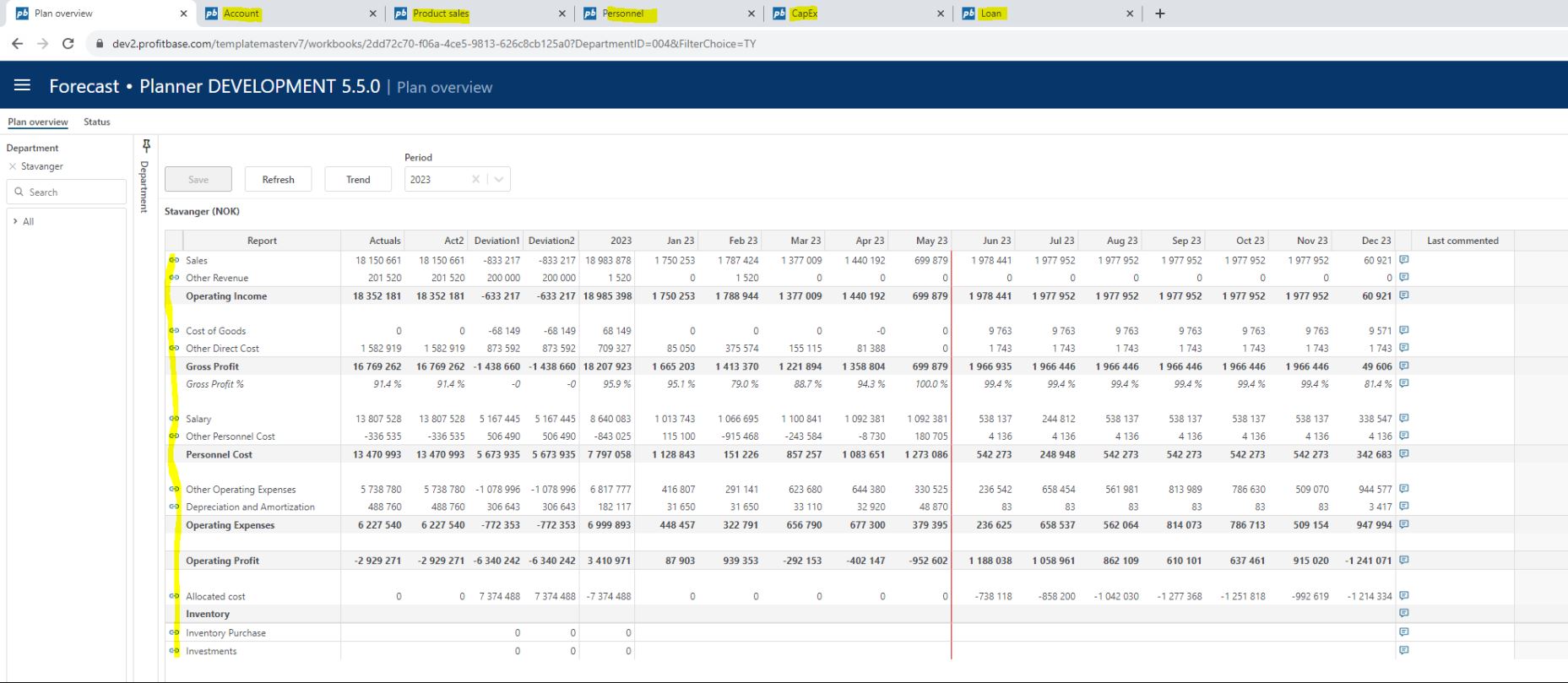
Changed default navigational pattern between Plan overview and input modules. By default (click a report line or launch input module from module launcher drop down), navigation to an input module will now launch the module in a new browser tab in the same browser window as opposed to launching it in the same tab as has been the case up until now.
The Plan overview will receive a message from the input module to refresh once data is saved and submitted and will automatically refresh. A spinner with text "Submitting data, you can resume editing" will display in the input module for the duration of the submit process.
The Back button will be disabled as you may switch between tabs and will be removed in a future version. Re-launching an input module from the Plan overview will relaunch it in it's existing tab. It is still possible to right-click a report line and launch the associated input module in a new window. (#1485)
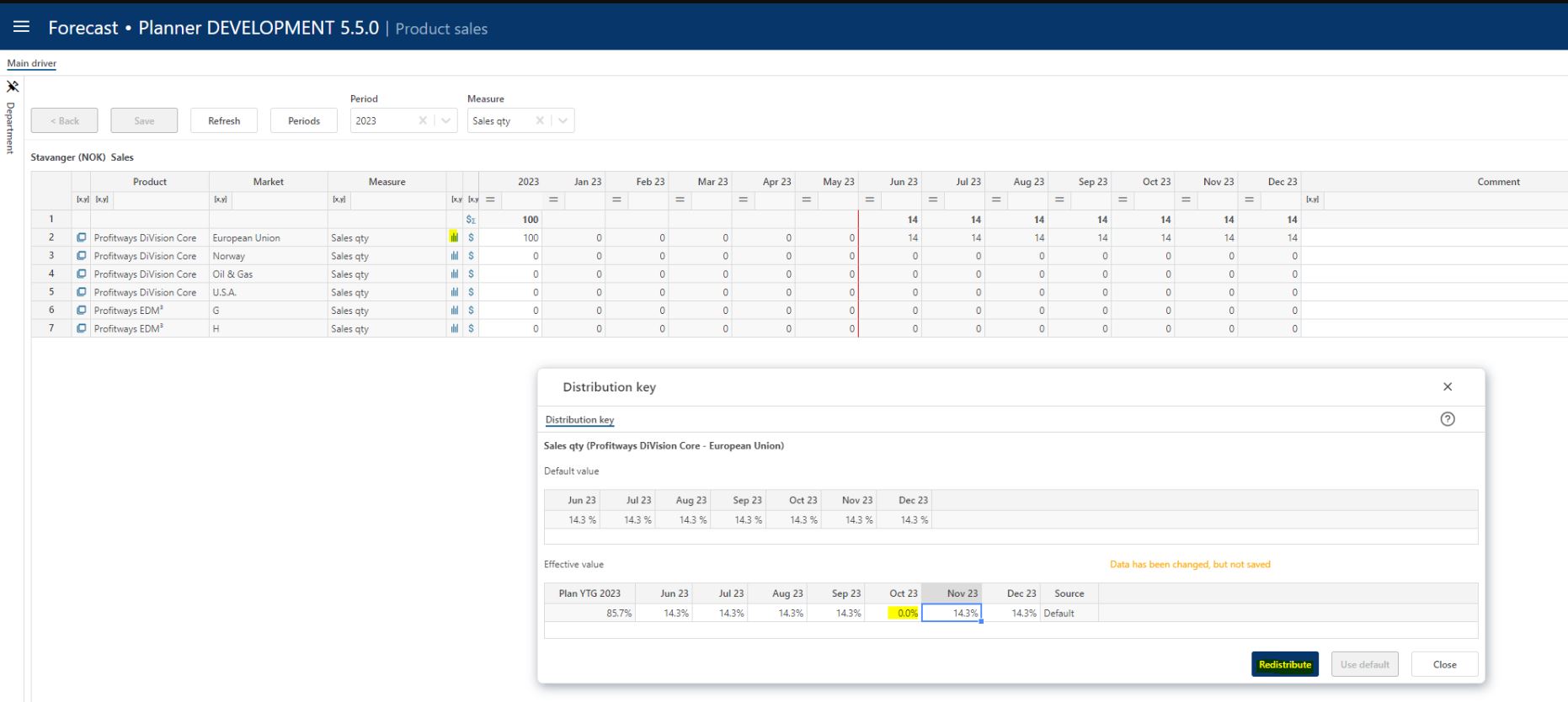
- Driver based module - ability to redistribute a total using percentages (%) Up until now, you could redistribute data by altering the amounts in individual periods. New for this version is the ability to redistribute measures that apply for distribution using percentages. This is done in the Distribution pop-up (#1430):
Dimension names displayed in module specific configuration tables in individual versions even when Central dim options is used. Central dim options allows for a central naming of dimensions. These dimensions are used for module-specific configuration and the names set centrally is now displayed in addition to the dimension key to avoid any confusion.
In addition, a message is displayed in the version specific translation table to inform that any translations for dimension names must be set in the central Report Setup workbook if central dim options is used. (#1434)

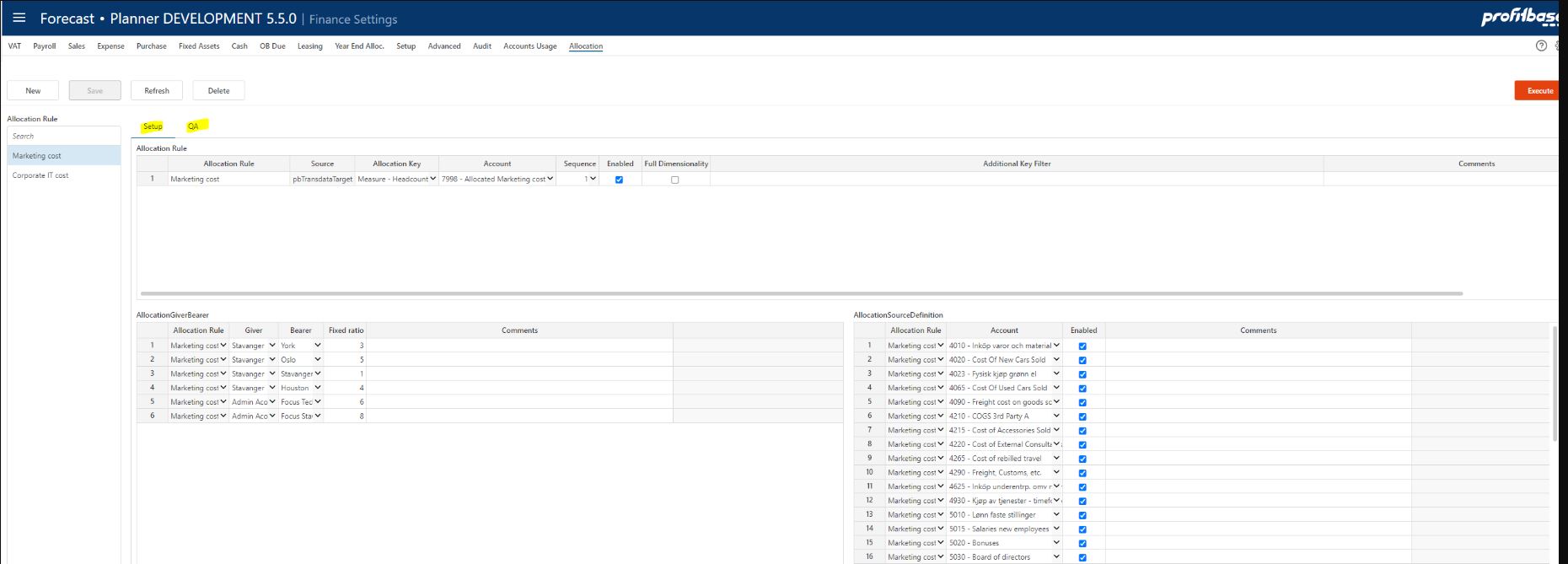
- Layout of the Allocation page in Finance Settings is improved by introducing a tab control with two sub screens, one for the Setup of the allocation rules and one for the QA part listing distribution keys and allocation transactions. In addition, input validation is introduced and enforced, meaning that duplicate rows can not be saved. This applies to giver-bearer and source accounts. The change is non-functional, a pure visual change to improve usability. (#1476, #1542)
ShortTermCash calculation does not include opening balance when plan start periode is 1 (typical for yearly budget) (#1513).
Only actual OB cash is included. For a yearly budget, actual opening balance will normally not be available. When plan start periode is after first fiscal period, the opening balance is normally based on actual YTD and hence will be calculated correctly. However if you adjust the OB, the adjustments will not be included in calculation.
Changed: Functional: Yes; User interface: No; Data model/schema: No
Package(s) changed: EPM Planner v5.5 only
Tax calculation is wrong in certain cases (#1500)
Tax calculation is wrong in the following cases because the 'net before tax' will be different in the report and in the source for tax calculation in system. These are the cases:
- All Profit/Loss accounts are not mapped to an account in Account dimension. These will appear with internal text instead of account id in Trial Balance report. This is user error.
- Internal trading with counterpart will normally set up sales with expense as counter-account. This works correctly. If the counterpart is set as "not expense" and with a balance account, the system post the counter-amount as "purchase" and tag it as profit/loss. This is as implemented but not clear and limiting use and will be changed.
- Tax calculate for plan start period will include the year-to-date in net before tax. This is wrong (Bug)
The functional changes here are:
- Only accounts from Account dimension with type Profit/Loss will be included as basis ('net before tax') for calculating tax .
- Only plan period postings is included in the basis for tax calculation.
- Simulation engine will tag counter transaction as balance when counter account setting is 'Is Expense' = false.
Changed: Functional: Yes; User interface: No; Data model/schema: No
Package(s) changed: EPM Planner v5.5 only
Internal Sales - changes and additions to internal sales accounts and counter-accounts may not be applied to Plan Overview (#1509)
This is because to internal logic to detect changes to tables that should cause the mapping table to be updated.
Workaround: Use the Finance Reports simulated data where internal sales accounts will be correctly applied.
The change here is to always update the internal mapping table whenever Sales settings is saved.
Changed: Functional: Yes; User interface: No; Data model/schema: No
Package(s) changed: EPM Planner v5.5 only
Internal Sales - error message when trying to define the finance setting for Sales Intercompany Accounts (#1466)
The error message:
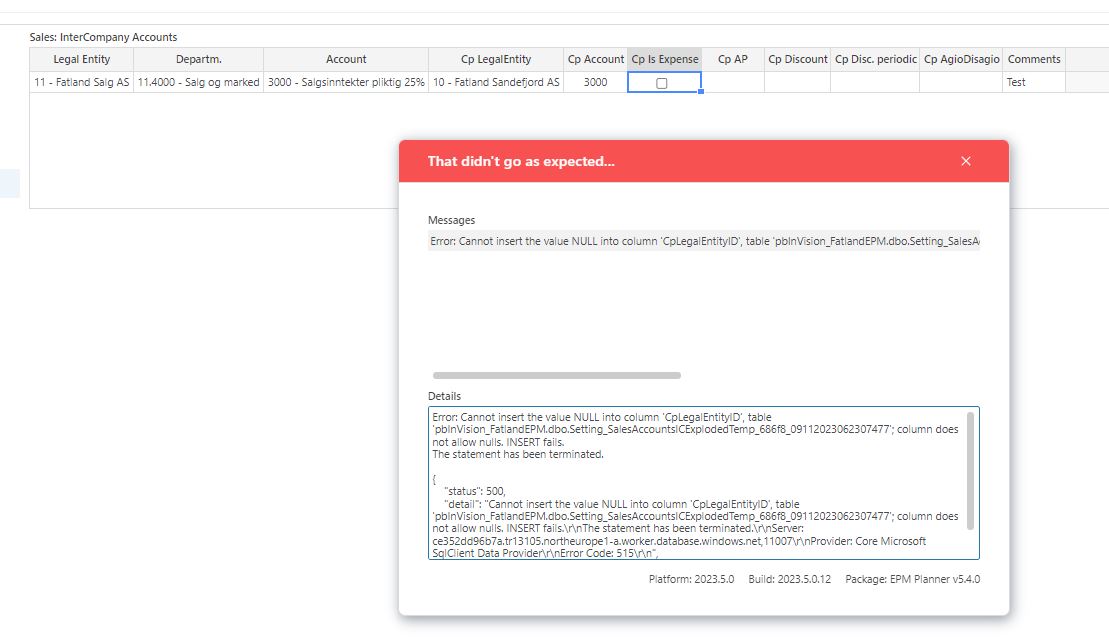
The reason for this is that elimination Legal Entity counterpart mapping is not defined or updated with the counterpart and elimination entity involved. (See Dimensions workbook and page for Elim.Legal Entity Mapping).
The change here is to give a more instructive error message explaining the reason for the error.
Changed: Functional: Yes; User interface: No; Data model/schema: No
Package(s) changed: EPM Planner v5.5 only
Wrong (duplicated) values in Plan Overview when using additional dimension mapping to map same account(s) to different report lines (#1388).
This bug will apply to all "Input" reports that got one or more accounts split over more than 1 report line.
Transactions are mapped to report lines based on account only and hence if the reportline is split by other dimensions, duplicate data will be introduced.
The change here is to ensure that original transactions keep the original reportline mapping. This will also apply to elimination transactions posted. For counterpart transactions posted on counter-account on counterpart legal entity and on elimination legal entity, it is assumed that this counter-account (normally a cost account) is not split across multiple accounts. In other words is is assumed that mapping counterpart account only on account is sufficient. This is a simplification to ensure that this change does impact performance.
Limitation: As state above is counter-accounts is mapped across multiple report lines using additional dimensions, this will not work.
Changed: Functional: Yes; User interface: No; Data model/schema: No
Package(s) changed: EPM Planner v5.5 only
Enable additional content to Plan overview
It will now be possible to include company tax and interest from cash an overdraft to "Plan overview" without having to change the standard configuration (#1462).
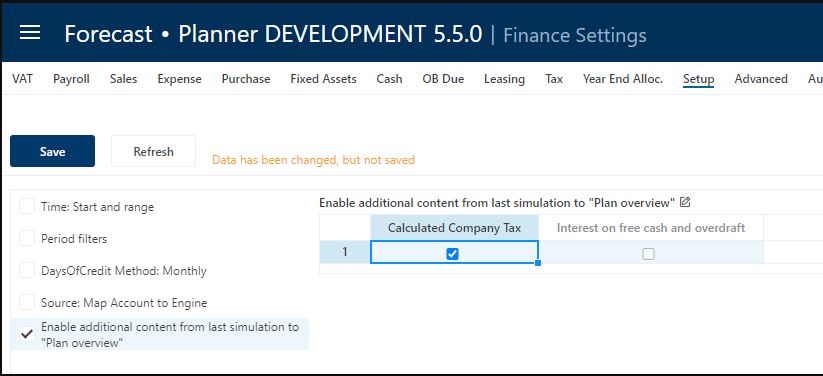
The above setting will ensure that e.g. tax data from last simulation is available to be included in the input report. Note that tax data is calculated for each legal entity and hence will not be available nor correct on department level.
It is recommended to stop Plan overview input report setup at EBIT level and leave the complete P&L report to "Finance Reports" (after simulation). The reason for this is that:
- Company Tax is calculated based on Net results including interest from cash and overdraft. This is not possible to calculate accurately without a cash balance per day/month from all transactions involving cash. This is what is done during simulation.
- Data will be from last simulation and hence will not be correct after P&L input is changed in Plan overview.
Changed: Functional: Yes; User interface: Yes; Data model/schema: Yes
Package(s) changed: EPM Planner v5.5 only
Year end transfer is not posted on accounts
When using "Year end Alloc." you may see that year end transfers is not posed on accounts according to system fallback account mapping. This is because of an error in simulation dataflow (setting Debug flag to "True"; should be set to "False") (#1539).
Changed: Functional: Yes; User interface: No; Data model/schema: No
Package(s) changed: EPM Planner v5.5 only
Input validation introduced in Input Settings and Administration as well as Finance Settings. Mandatory fields are highlighted when null when new rows are added. (#1560)
Logging is improved for dataflows such as version deployment and transaction pipelines (processing of Account, Personnel and Driver Based input). The version deployment log is visible in the Version Manager when deploying a new version and the the transaction pipeline logs are visible either in Operation manager (when run from an operation) or in the Profitbase InVision designer. (#1544)
Historical reference data generated if configured regardless of the columns being visible. (#1503)
Payroll engine: transactions with TransTypeID = 1 are now included (#1532)
Departments can be set inactive for plan input. A new attribute AllowInput is added to the Department dimension (default true). When false, data for the department is not editable and actions such as Insert new row, delete row, etc do not take effect. (#1595)

Bug fixes and GitLab reference list:
- Plan proposal - Set adjustment factor. Month columns display incorrectly for NY+1 (#1569)
- Year End Due engine fails due to field value too large (#1568)
- Year and closing - missing metadata (#1564)
- Plan overview - Historic reference data at group nodes in multi currency solutions incorrect if group by dimension columns are null and not (#1538)
- Account Plan proposal historic grouping done based on visibility and not the group source data attribute (#1533)
- Account plan proposal translation missing (#1520)
- Additional report line - dimension mapping was not implemented for Account Plan proposal (#1515)
- Measure - map ledger account to measure - name of measure does not display correct translation (#1514)
- Account drill to details report - double depreciation rows when same asset planned in the CapEx module had different comments in different years (#1511)
- Personnel - vacation month salary reduction and pay raise not recalculated when altering FTE (#1505)
- Wrong historical numbers in Plan overview because actual historical data from Planner solution and actual data from Consolidation solution is added and resulting in doubled historical numbers (#1502)
- Driver based - mandatory filter ignored when making a selection in the measure and/or period drop downs (#1501)
- Account module and multi department input: altering period filter when row limit is exceeded leaves rows in an IsLocked state (#1499)
- PostUpgrade fails when upgrading solution as script Explode SalesAccountsIC does not handle collation conflicts (#1495)
- Input modules - row context attempted set when clicking the $ icon on the sum row yielding an invalid context (#1490)
- Deviation columns do not use sign factor in account module and account details report. (#1484)
- Account Plan Proposal - incorrect guidance text. (#1482)
- Loan module - unable to add a 0 principal override. (#1480, documentation clarification)
- Import from source fact to Personnel module incorrect for historic FTE and historic monthly salary (#1477)
- Import of ledger data using amount foreign. Clarification in data requirements documentation and introduction of the ability to choose whether to group source data or not for the currency foreign dimension (#1468)
- Various issues related to translations not working properly (#1436, #1450, #1459, #1467, #1483, #1487)
- Finance reports extension deployed locally in a Planner version fails (#1428)
- Custom button not working (Account and Personnel modules) (#1427)
- Custom button names restored on upgrade (#1426)
- Changing the name of a driver based model did not have effect in all filters and workbooks (#1612)
- Fixed assets, Investment and Loan financial engines use the current (and no longer long) time selection option. This reduces the amount of data output (#1114)
- Driver based: distribution of next year's total did not include the December next year period column. Applies to summable measures in a plan with start January 1st making December next year period column#24 (#1616)