Setup
Applies to:  Planner 4
Overview
In publishing and graphic design, Lorem ipsum is a placeholder text commonly used to demonstrate the visual form of a document or a typeface without relying on meaningful content.
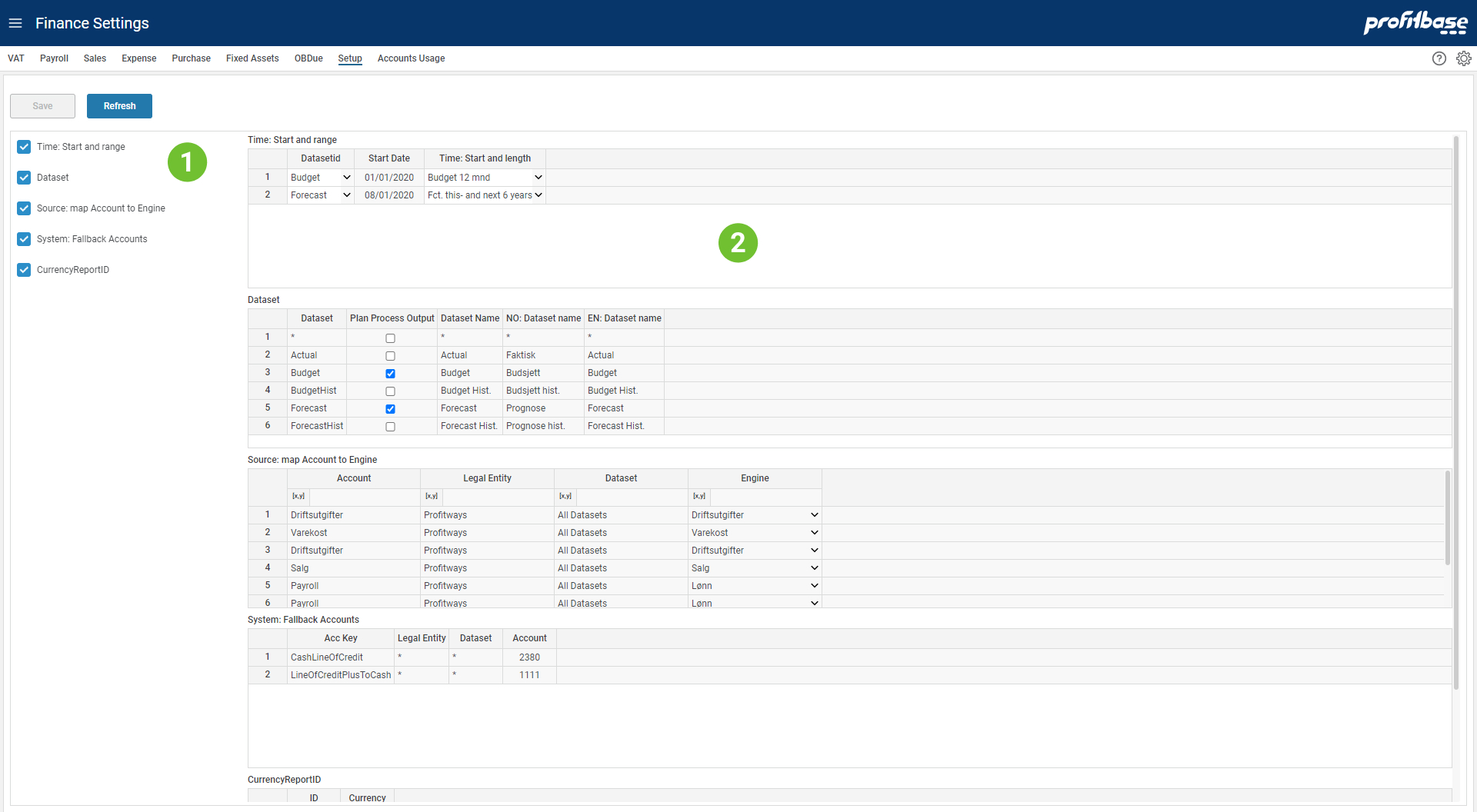
- Selecting Setting Table
The left area list the different setting tables available for the page. Ticking here will turn on and off the table. - Tables View
The right area will display the selected tables and allows users to edit content.
Descriptions
Each table and columns are described below.
Key columns used for matching when looking up correct setting is marked (k).
Time: Start and range
This table defines the start date and length for each planning dataset (i.e. Forecast and Budget).
Columns:
- Dataset (k)
Dataset is one of 'Forecast' or 'Budget'. - Start Date
Read-only columns that shows the start date for current Forecast and Budget dataset. For rolling forecasts (and budget) this date will change every time the dataset is rolled forward. - Time: Start and length
Selection of time range that allows for up to 7 years planning.
Fiscal Calendar Offset
This table is used to define a Fiscal year and periods that is offset from a normal calendar. Leaving this table empty will use the calendar.
Columns:
Fiscal start date
Set to be the date of first day of a Fiscal calendar year.Fiscal Year
Set to the year number of the Fiscal year that starts on Fiscal Start Month number of months after the Calendar start date. This must be set to the year that the Fiscal year ends or to the Fiscal calendar start year.
Fiscal Calendar is used to set the year, quarter and month in the Time dimension. Time dimension is used to control how data is aggregate on Fiscal year and months.
Example: Setting "Fiscal Start Date" = 2020-08-01 and "Fiscal Year" = 2021 will set the start period to one for transactions in august and the year will be set to 2021 which is the calendar year of the last day of the Fiscal year.
Setting "Fiscal Start Date" = 2020-01-01 and "Fiscal Year" = 2020 is equivalent to using an empty table.
Dataset
This table define the dataset and their naming, including translations.
Columns:
- Dataset (k)
Dataset is one of 'Forecast' or 'Budget'. - Plan Process Output:
Set to true for dataset that are planning datasets (i.e. Forecast and Budget) and subject to simulation to create the ledger looking ahead. - Dataset Name
Name of dataset as presented in the solution. - NO: Dataset name
Norwegian translation for the name. - EN: Dataset name
English translation for name.
Caution:
Note that the built-in Planner logic is limited to planning datasets identified as "Forecast" and "Budget". Custom-built extensions will be required to work with other planning datasets.
Source: map Account to Engine
This table maps input accounts to the different posting engines.
Columns:
- Account:
Account group or single accounts that will be input to the selected engine. - Legal Entity (k)
Legal Entity applicable. - Dataset (k)
Dataset is one of 'Forecast' or 'Budget'. - Engine
Engine name.
Be careful when doing the mapping to avoid sending any account to just one engine.
System: Fallback Accounts
This table maps internal account keys to your accounts. There are already quite a few tables where account use is defined but there will be accounts and in particular balance accounts that are used but not mapped elsewhere. Please check Finance Reports Trial Balance report for accounts that are used but not mapped.
Columns:
- Acc Key (k)
The system internal name for the account. This name will be used whenever an account mapping is missing. - Legal Entity (k)
Legal Entity applicable. - Dataset (k)
Dataset is one of 'Forecast' or 'Budget'. - Account
Your account to be used.
CurrencyReportID
This table defines the currency to be used as default reporting currency during simulation.
Columns:
- ID:
ID must be set to "Finance" for the Planner solution. - Currency:
Currency code (3-character code).