Upload Blob
Uploads a byte array or Stream to an Azure Blob container.
Example 
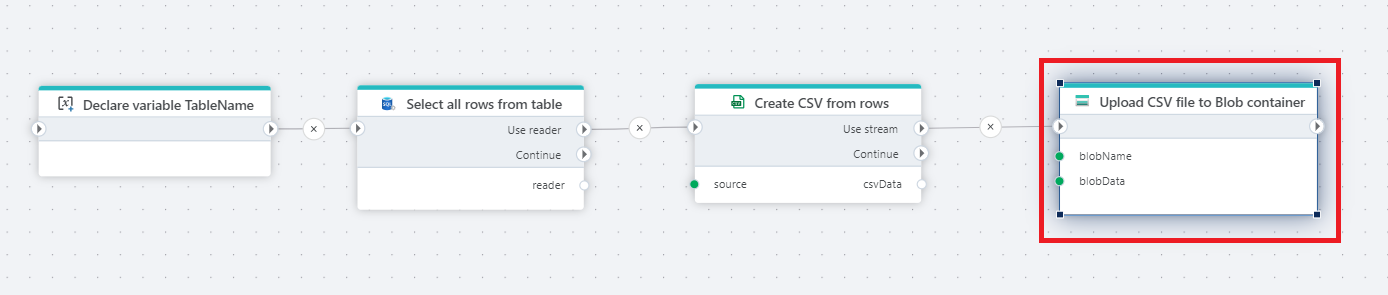
This flow extracts data from a table, convert it into a CSV file, and upload it to an Azure Blob Storage container. Used actions: Declare Variable, Get DataReader, Create CSV file as stream and Upload Blob.
Properties
| Name | Required | Description |
|---|---|---|
| Connection | Yes | The Azure Blob container connection. The currently supported options are SAS URI and Connection string + container name. |
| Dynamic connection | No | A connection dynamically created using the Create Azure Blob container connection action. |
| Blob name | Yes | The name of the blob (file) |
| Blob data | Yes | The data to upload. It must be a byte array or Stream |
| Overwrite if blob already exists | No | If not checked, the action will fail if a blob with the same name already exists. |
Azure Blob Storage: Videos / Getting started
This section contains videos to help you get started quickly working with Azure Blob Storage using Flow.
Dump CSV file from Azure Blob container to Azure SQL table
This video demonstrates how to import all records from a CSV file in Azure Blob Storage into an Azure SQL table.
In the demo, no data import options (such as data type conversion, number or date formatting) are specified, meaning the data is imported as raw text.