Get DataReader
Executes a SQL query and returns a forward-only DataReader stream for reading rows from a SQL Server database. The DataReader is exposed as a Flow variable that downstream actions consume — for chunked processing, CSV export, data transformation, or loading into another table.
Use this when you need to pass a full result set to another action rather than iterating row by row.
When to use this
- To read a large result set and pass it to a chunking action for batch processing (e.g. CSV export in chunks to blob storage).
- To feed query results into actions that accept a DataReader as input, such as data transformation or bulk insert actions.
- When you need streaming access to query results without loading the entire result set into memory.
Note
A DataReader is forward-only — it can be read once. If you need to iterate over rows individually with per-row logic, use For Each Row from Query instead.
How it works
- Input: A SQL query (with optional parameters) and a SQL Server connection.
- Processing: Executes the query and opens a DataReader stream. The reader is assigned to the Flow variable specified in Reader variable name. Actions connected to the Use reader output port run while the reader is open.
- Output: Returns an IDataReader. After all connected actions complete, the reader is closed and execution continues from the Continue output port.
Example 
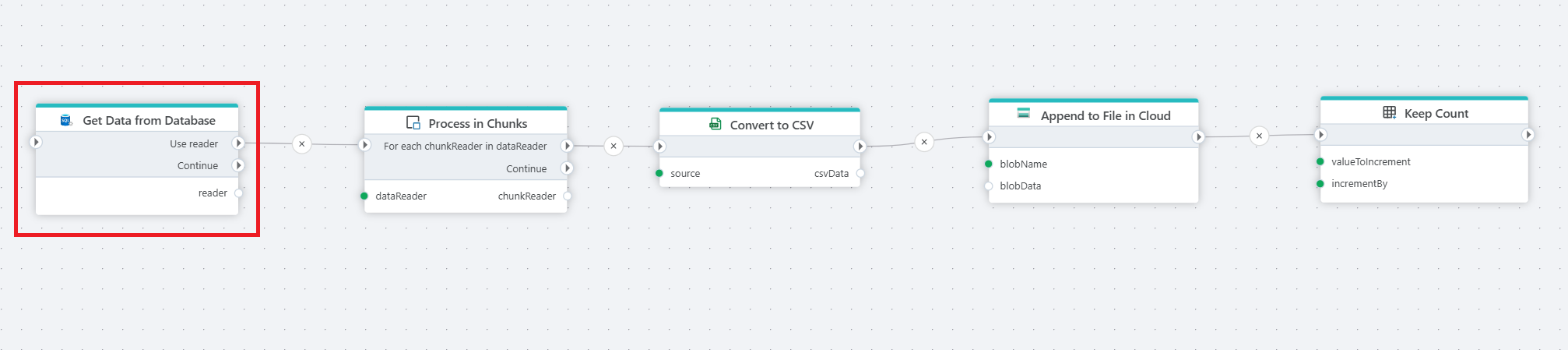
This flow exports database rows to a CSV file in cloud storage, processing the data in chunks to handle large result sets. Get Data from Database executes the query and exposes the result as a DataReader. DataReader Chunker splits the stream into smaller batches. For each chunk, Create CSV File as Byte Array serializes the rows to CSV format, and Append to Blob appends the data to a file in blob storage. Use this pattern for large exports where loading the entire result set into memory is not practical.
Properties
| Name | Required | Description |
|---|---|---|
| Title | No | A descriptive title for the action. |
| Connection | Yes | The SQL Server Connection to the target database. |
| Enable dynamic connection | No | When enabled, uses a connection created at runtime by Create Connection. Use this when the target database varies between runs. |
| SQL expression and parameters | Yes | The SQL query to execute, with optional parameters. Supports parameterized queries and Flow variable interpolation. See Execute Command — How to use parameters for syntax. |
| Reader variable name | No | The name of the Flow variable that holds the DataReader. Default is reader. Downstream actions reference this variable to consume the result stream. |
| Command timeout (seconds) | No | Maximum execution time in seconds. The action fails with a timeout error if exceeded. Default is 120 seconds. |
| Disabled | No | When checked, the action is skipped during Flow execution. |
| Description | No | Additional notes or comments about the action or configuration. |
Returns
IDataReader. A forward-only stream of rows from the executed query. The reader remains open while actions connected to the Use reader port execute, and is closed automatically when they complete. If the query returns no rows, the DataReader is empty (open but yields no records).
See also
- For Each Row from Query — iterates over rows one at a time with per-row logic.
- Get Single Value — returns a single scalar value from a query.
- Execute Command — executes a SQL command without returning results.
- Connection — how to set up a SQL Server connection.
SQL Server: Videos / Getting started
This section contains videos to help you get started quickly working with Azure SQL / SQL Server using Flow.
Dump CSV file from Azure Blob container to Azure SQL table
This video demonstrates how to import all records from a CSV file into an Azure SQL table.
In the demo, no data import options (such as data type conversion, number or date formatting) are specified, meaning the data is imported as raw text.