Get Share Items Info
Retrieves a list of information about files or directories from an Azure Files share.
Example 
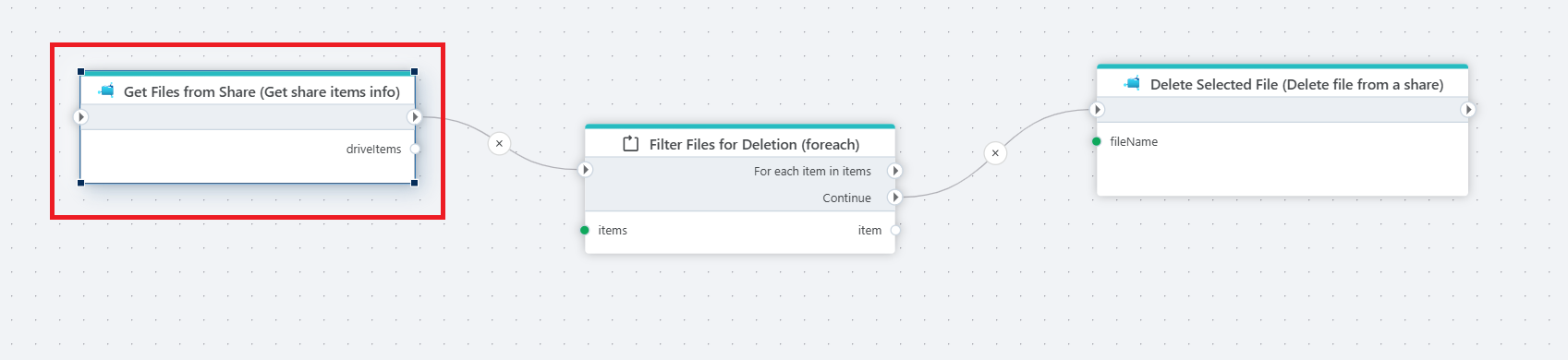
The example above retrieves all file informations from a share using the Get Share Items Info action. It then iterates over each item using a For each loop. Each file is passed to the Delete file from a share action.
Note
The filtering logic is implemented inside the Foreach action, allowing only the relevant files to proceed to deletion.
Properties
| Name | Required | Description |
|---|---|---|
| Connection | Yes | The Azure Files connection to a share. |
| Directory | No | The directory to retrieve information from. |
| Prefix | No | An optional file name prefix to filter files. |
| Include directories | Boolean | Whether to include directories along with files. |
| Include files in subdirectories | Boolean | Whether to traverse and include items in subfolders. |
| Result variable name | Yes | The name of the variable containing the collected information. |
Returns
This action returns a collection of ShareItemInfo objects, each describing a file or directory found at the specified location in the Azure File Share.