Restart Flow
Restarts the Flow at a specified time.
The Restart Flow action is typically used when you need to stop execution of a Flow and continue at a later point in time.If you don't know upfront when that will be, you can't use a Schedule trigger.
For example, if you are interfacing with rate limited service, and you have reached the maximum quota, you need to stop the current execution and wait until the quota resets.
The duration of the pause varies pr service, but it is not uncommon having wait times of up to an hour. Because your Flow will be terminated if it runs for too long, you need to use the Restart Flow action to end the current execution and resume work later.
Before the Restart Flow action, you need to store the current state (using any data storage action), and design the Flow so that it loads any state at the beginning of each run.
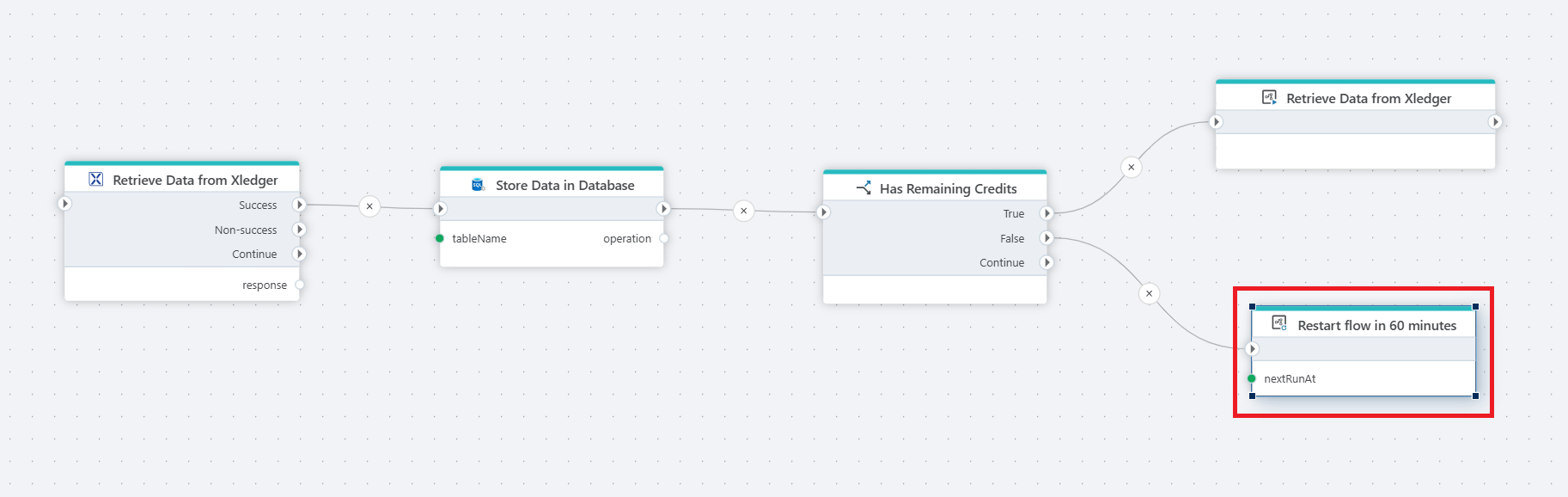
Example 
This flow retrieves financial data from XLedger, stores it in a database, and checks if there are remaining credits. If credits are available, it continues fetching data. If the 50,000 credit limit is reached, the flow restarts after a 60-minute delay to resume processing.
Properties
| Name | Required | Description |
|---|---|---|
| Title | No | The title of the action. |
| Next run at | Yes | The scheduled date and time (DateTimeOffset) when the flow will execute next. |
| Input | No | The input data passed to the flow. |
| Description | No | A description of the flow. |