Convert a PowerPoint file to Markdown
Converts a PowerPoint file to Markdown.
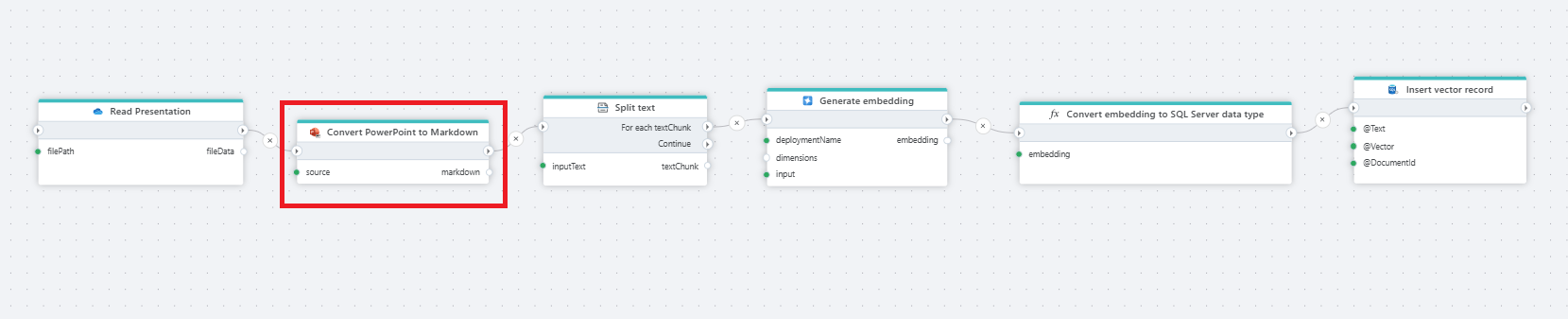
Example 
This Flow reads a presentation (PowerPoint file) from OneDrive, converts it to Markdown, splits the text into chunks, generates embeddings for each chunk, converts the generated vector into a SQL Server-compatible format and stores the text, vector, and document reference in a SQL Server table. This table can then be used for vector search or to feed chat models with the extracted information.
Properties
| Name | Required | Description |
|---|---|---|
| Title | No | The title of the action. |
| File data | Yes | Specifies the source of the PowerPoint file, which can either be a Stream or a Byte Array. |
| Conversion engine | Yes | Select the engine to use in conversion, see below for details. |
| Result variable name | Yes | The name of the variable in which the result will be stored. |
| Description | No | Additional notes or comments about the action or configuration. |
Conversion engines
- Docling provides the most complete extraction and is best for complex presentations, including tables, mixed slide layouts, and embedded images. It is the slowest option and can require significant resources for large files. This is currently the only engine that supports image conversion.
- Kreuzberg is a balanced option for larger presentations. It is typically faster and more resource-efficient than Docling, but may produce less accurate results on complex slide layouts.
- MarkItDown is optimized for text-focused presentations. It is a good choice when speed and clean text output are the top priority, and it uses a custom fine-tuned model.
Returns
This action returns a string/text in Markdown format.