REST API Request with paging
Use Tripletex REST APIs (v2) to read paged data.
The REST API Request with paging action iterates over a paged Tripletex endpoint automatically, exposing one page at a time on its For each page port until Tripletex returns no more pages. Use it for list endpoints that return large result sets (customers, invoices, ledger postings across a date range) where requesting everything in one call would time out or exceed memory.
For single-record reads or non-list endpoints, use REST API Request — that action does not page and is simpler to configure.
Example 
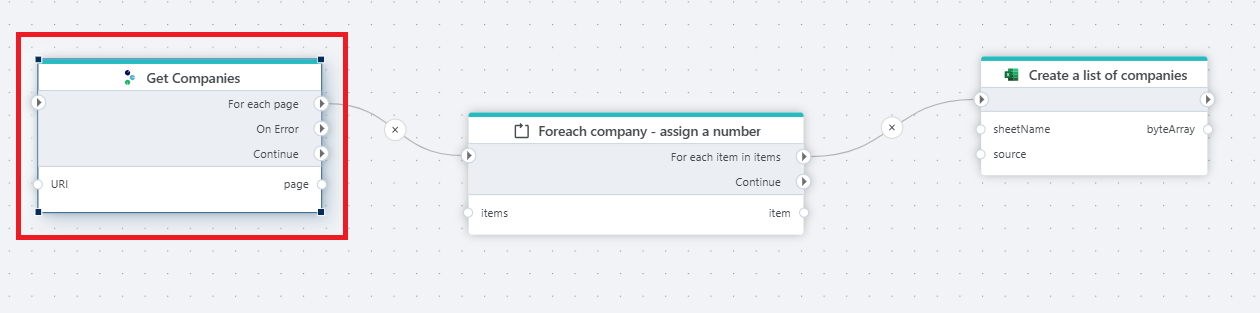
This flow downloads every company from Tripletex and writes them to an Excel file. Get Companies is a REST API Request with paging action configured against the Tripletex company endpoint, with the URI passed in through the URI input port. The action emits one page of companies at a time on its For each page output port; page carries the deserialised page object (companies plus paging metadata). Each page is fed into Foreach company - assign a number, which iterates the companies array element by element — For each item in items fires once per company, exposing the company on the Item port. Downstream, Create a list of companies builds up an Excel worksheet from the stream of items and emits the resulting workbook as byteArray on its output port. If the API call fails, the On Error port lets the Flow handle the failure without terminating; the Continue port runs after all pages have been processed, regardless of success. This pattern — paged read → foreach → accumulating writer — is the standard shape for extracting large Tripletex datasets into a file or staging table.
Use cases
- Extracting a full list from Tripletex (all customers, all invoices, all projects, all ledger postings) into a staging table or file.
- Downloading a filtered date range (
orderDateFrom,orderDateTo) that returns more rows than fit in a single response. - Building reports that need every row of a Tripletex entity, not a sample.
- Initial sync of a Tripletex dataset into a data warehouse before switching to webhook-based incremental updates.
For single-record reads or non-list endpoints, use REST API Request.
Properties
| Property | Required | Description |
|---|---|---|
| Title | No | Display name of the action node on the Flowchart. Defaults to REST API Request with paging. The current value is appended to the label of the Edit configuration field (Edit configuration - {Title}). |
| Connection | No* | The Tripletex Connection used at runtime, unless Enable dynamic connection is on. When the toggle is on, Connection is used at design time only — for endpoint autocomplete and request validation — and is greyed out in the property panel. One of Connection or Dynamic connection must be set for the action to run. |
| Enable dynamic connection | No | Toggle that switches the action between static and dynamic connection mode. Off: the action uses Connection. On: Connection becomes design-time only and Dynamic connection controls the runtime connection. |
| Dynamic connection | No* | Visible only when Enable dynamic connection is on. Bind it to a Connection variable produced by the Create Tripletex Connection action. |
| Edit configuration - {Title} | Yes | The HTTP request to send — method (always GET for paged endpoints), URI, parameters, response type. Click the field to open the request editor; pick a template from New Request or define the request manually. The summary in the property panel shows the HTTP method and Configured (edit for details) once set; an empty configuration shows Define configuration. |
| Start index (from) | No | Zero-based index of the first record to retrieve. Maps to the Tripletex from query parameter. Defaults to 0. Set this when resuming a partially-completed extract or when skipping a known prefix of the result set. |
| Items per page (count) | No | Number of records per page. Maps to the Tripletex count query parameter. Defaults to 5000. Higher values reduce the number of HTTP round-trips but increase per-page memory usage and risk Tripletex timeouts on slow endpoints. |
| Max page count | No | Hard limit on the number of pages fetched. Defaults to 9999. The action stops after this many pages even if Tripletex has more — set higher than your expected page count to avoid silent truncation. |
| Disabled | No | When checked, the action is skipped at runtime and execution flows straight to the Continue output. Use during development to bypass a step without removing it from the canvas. |
| Description | No | Free-text notes about the action. Not used at runtime. |
*At least one of Connection or Dynamic connection must be configured.
Output ports
The action exposes three control output ports and one data output port:
| Port | Type | Triggered |
|---|---|---|
| For each page | Control | Once per page returned by Tripletex. Wire downstream processing here. |
| On Error | Control | When the API call fails (network error, 4xx/5xx, malformed response). Receives the page that failed; processing of subsequent pages stops unless the handler re-enters the iteration. |
| Continue | Control | Once, after all pages have been processed (or the iteration was stopped). Wire summary, logging, or cleanup actions here. |
| page | Data | The deserialised page object for the current iteration. Type matches the Response Type set in Edit configuration. |
Returns
The return type is set in Edit configuration. The two options are:
- A custom data type defined when configuring the request — useful when the response shape is known and stable.
- The raw JSON response from the API, wrapped in
HttpResponse<T>— the default and recommended choice.
HttpResponse<T> exposes the response body, HTTP status code, and an IsSuccess flag with ErrorContent populated on failure.
For large extracts, use HttpResponse<string> and parse each page downstream with Get JSON DataReader into rows and columns — for example, inserting directly into a SQL Server staging table. Parsing per page rather than allocating a custom strongly-typed result for every row keeps per-page memory usage flat regardless of total dataset size.
Configuration
Defining the request
Open Edit configuration in the property panel. Start from a template via New Request, or define the request manually:
- Method — always
GETfor paged endpoints. POST/PUT/DELETE endpoints are not paged. - URI — the Tripletex endpoint, for example
customer,invoice,project. Add filter parameters in the URI or as query parameters (for example?orderDateFrom=2025-01-01&orderDateTo=2025-12-31). Use the variable picker that appears when the URI field has focus to bind values from upstream actions. - Headers — authentication is set automatically from the connection. No additional headers are needed for standard Tripletex endpoints.
- Response Type — defaults to
HttpResponse<string>. Change to a custom type only when the per-page response shape is known and the dataset is small.
For endpoint-level details (paths, parameters, response models), refer to the Tripletex API documentation.
Paging behaviour
The action requests one page at a time from Tripletex (from and count query parameters set from Start index and Items per page), emits the page on the For each page port, then requests the next page. Iteration stops when Tripletex returns fewer records than Items per page or when Max page count is reached.
The For each page port fires synchronously per page — the next page is not requested until the downstream subgraph completes. This means downstream actions can be slow without causing Tripletex to drop the connection.
Error handling
When Response Type is HttpResponse<T>, the response object includes an IsSuccess flag and an ErrorContent property. On failure, IsSuccess is false and ErrorContent holds the error message from the Tripletex API or from an internally thrown exception. The action does not raise an error in this case — downstream actions can branch on IsSuccess.
For other response types and for severe errors (connection refused, malformed response), the action raises an error that terminates the Flow unless either:
- The On Error output port is connected to a handler.
- The action is wrapped in a Try-Catch block.
The On Error handler is triggered per page, not per record — one failed page does not invalidate previously-processed pages. Wire it to a Throw exception or a logging action to record the failure and decide whether to halt or continue.
API limits
Tripletex enforces rate limits. When the limit is exceeded, the API returns 429 Too Many Requests. The action retries automatically (three attempts) before surfacing the error.
To avoid hitting the limit:
- Use the
fieldsquery parameter to request only the columns needed — smaller responses are faster and cheaper. - Narrow result sets with date and ID filters where possible (
orderDateFrom,orderDateTo,customerId). - Stagger high-volume paged Flows away from each other — running three full extracts in parallel triples the per-second request rate.
See Tripletex integration best practices for endpoint-level guidance.
See also
- REST API Request — for single-record reads and non-list endpoints.
- Tripletex Connection — the static connection used by this action.
- Create Tripletex Connection — builds a connection at runtime for use via the Dynamic connection property.
- Get JSON DataReader — parses raw JSON page responses into rows and columns.
- Foreach — iterates over the records within each page.
- Tripletex API documentation — endpoint reference for Tripletex REST API v2.