Incremental Blob Trigger
Configures the Flow to automatically run by periodically checking for new or modified blobs in an Azure Blob Container.
This trigger is useful for automating processes that should only act on freshly uploaded or updated files, rather than scanning all blobs every time.
Use cases trigger vs. the standard Blob trigger
Use Incremental Blob Trigger when:
- You only want to process new or modified files since the last run.
- You’re working with containers that hold many blobs and you want to avoid reprocessing unchanged files.
- You need to limit how many files are processed per run (via Number of blobs).
Use Azure Blob Trigger when:
- You want to regularly list all blobs in a container (or within a prefix).
- You need to process every file, regardless of when it was added or updated.
- You’re setting up a one-time or recurring job that depends on scanning a whole folder.
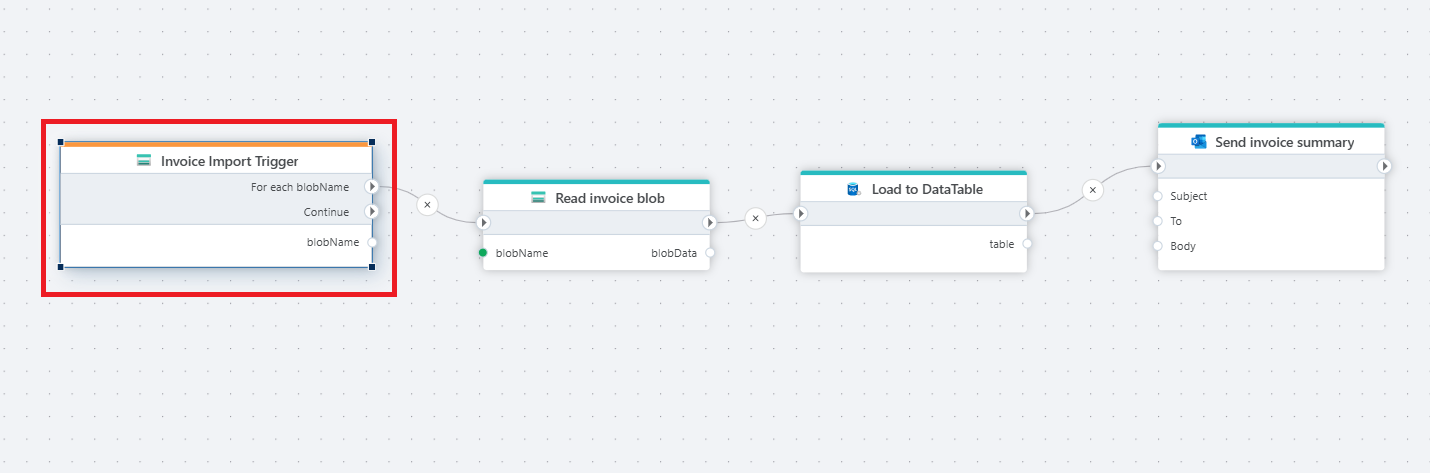
Example
This Flow listens for new or updated invoice files in Azure Blob Storage, reads the file contents, loads the data into a DataTable, and finally sends a summary notification to the accounting team.
Properties
| Name | Required | Description |
|---|---|---|
| Title | No | A custom label for this trigger. This name will appear when selecting the trigger in a Flow. |
| Connection | Yes | An Azure Blob container connection. |
| Polling frequency | No | Defines how often the container should be checked for new or modified blobs (e.g., every 5 minutes, hourly). |
| Number of blobs | No | Limits how many new or modified blobs should be processed per polling interval. Useful for large containers or throttling. |
| Blob name | No | A specific blob name to listen for. If set, the trigger will only run when this blob is updated. |
| Disabled | No | Boolean value indicating whether the trigger is disabled (true/false). |
| Description | No | Notes or comments about the trigger’s purpose or configuration. |
Returns
This trigger returns a list of blob names that can be iterated over using a For Each action.
Example
Suppose you want to run a Flow whenever new sales reports are uploaded to the reports container.
You can configure the trigger as follows:
- Title:
Sales reports trigger - Connection: Connection to your Azure Blob container
- Polling frequency: Every 30 minutes
- Number of blobs: 10
With this setup, the Flow will pick up up to 10 new or updated blobs per run, process their contents, and update your database without reprocessing older files.