Load to DataTable
Loads data from a SQL Server database into memory as a DataTable object.
Example 
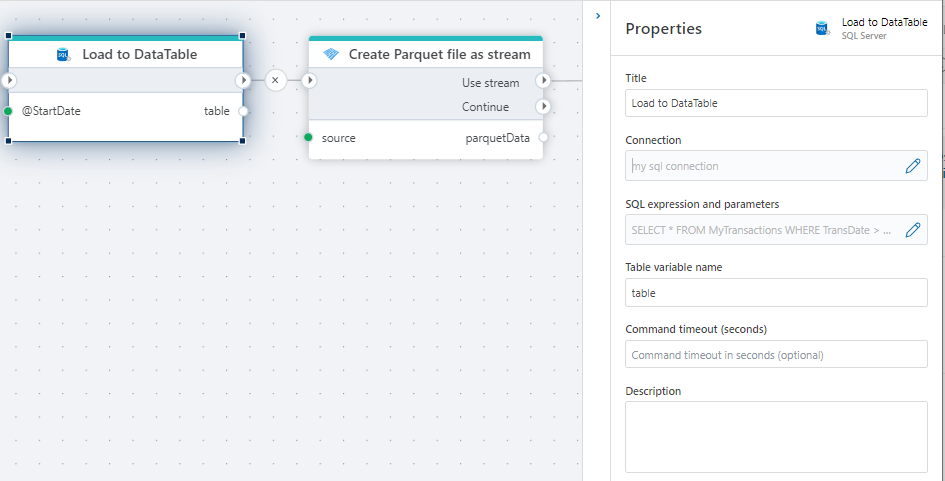
This flow loads transactions to a DataTable. The DataTable is then used to create a Parquet file that can be saved as a file in, for example, Azure file storage.
Properties
| Name | Required | Description |
|---|---|---|
| Title | No | A descriptive title for the action. |
| Connection | Yes | The SQL Server Connection to the target database. |
| Dynamic connection | No | When enabled, uses a connection created at runtime by Create SQL Server Connection. Use this when the target database varies between runs. |
| SQL expression and parameters | Yes | The SQL query to execute, with optional parameters. Supports parameterized queries and Flow variable interpolation. See Execute Command — How to build expressions and using parameters for syntax. |
| Table variable name | Yes | The name of the variable returning the DataTable |
| Command timeout | No | The time limit for command execution before it times out. Default is 120 seconds. |
| Description | No | Additional notes or comments about the action or configuration. |
Returns
Note
- The Object Explorer can only be used with a valid Connection and not Dynamic connection.
- The Object Explorer cannot be used with a Hypergene Flow system database.
See also
- Get DataReader — executes a query and returns the full result set as a DataReader for batch processing.
- For Each Row from Query — iterates over rows one at a time with per-row logic.
- Get Single Value — returns a single scalar value from a query.
- Execute Command — executes a SQL command without returning results.
- Connection — how to set up a SQL Server connection.
SQL Server: Videos / Getting started
This section contains videos to help you get started quickly working with Azure SQL / SQL Server using Flow.
Dump CSV file from Azure Blob container to Azure SQL table
This video demonstrates how to import all records from a CSV file into an Azure SQL table.
In the demo, no data import options (such as data type conversion, number or date formatting) are specified, meaning the data is imported as raw text.