Send Tabular Data trigger
Use this action to handle Send Data requests from InVision tabular components such as Worksheets, Tables, SQL Reports and Table Views. The typical use case is to use Flow for directly processing the tabular data displayed in the aforementioned InVision Workbook components without going through the InVision database or API. The trigger automatically converts the request payload to an object format that you can use in Flow to process the request.
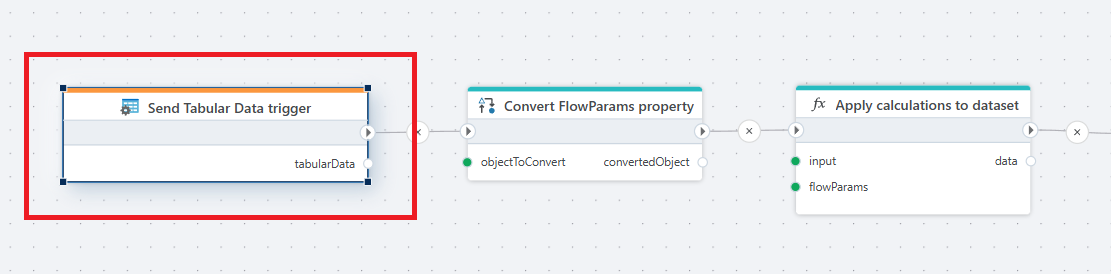
 The example above demonstrates the use of the Send Tabular Data trigger with the Convert action and a Function. In this case, the Convert action converts the FlowParams (see below) so it can be used by the business logic in the Function to apply calculations to the dataset passed in to the trigger.
Returns
The trigger returns an object on the following format. The Data property is a DataTable that contains the actual data of the InVision Worksheet, Table, SQL Report or Table View. Use the DataTable API to in a Function or convert the DataTable to business objects to perform operations related to the data.
public class TabularDataRequest
{
    /// <summary>
    /// The tabular data sent from an InVision Worksheet, Table, SQL Report or Table View.
    /// </summary>
    public DataTable Data { get; set; }

    /// <summary>
    /// The parameters defined by SetParamValue(...) calls in InVision.
    /// </summary>
    public Dictionary<string, object>? DataParams { get; set; }

    /// <summary>
    /// If specified, this is a JSON string (as sent by the InVision Workbook request) that can be deserialized to a custom business object defined in the Flow.
    /// This supports passing custom, complex parameters (like complex objects) that are not easily represented in a flat key-value structure like DataParams.
    /// </summary>
    public string? FlowParams { get; set; }

    /// <summary>
    /// The IANA time zone identifier (e.g., "Norway/Oslo") that specifies the time zone of the user in the InVision Workbook.
    /// It is useful for any type of date-related operations.
    /// </summary>
    public string TimeZone { get; set; }

    public string? DataSetId { get; set; }
}
How to use FlowParams
The FlowParams property contains a JSON serialized string representing the custom data payload (parameters) sent from InVision when calling the UseFlow(...) function.
To use this information (if specified), create a custom type in the Flow and convert it using the Convert action.