Code-behind
The code-behind lets you write JavaScript to calculate, validate and modify the dataset displayed in a sheet (for example Worksheet, Table or SQL Report).
To edit the code-behind, open the Calculations editor and switch to the Code-behind tab.
To get started, press Insert template. This will give you a code-behind class where you can implement the empty callback functions.
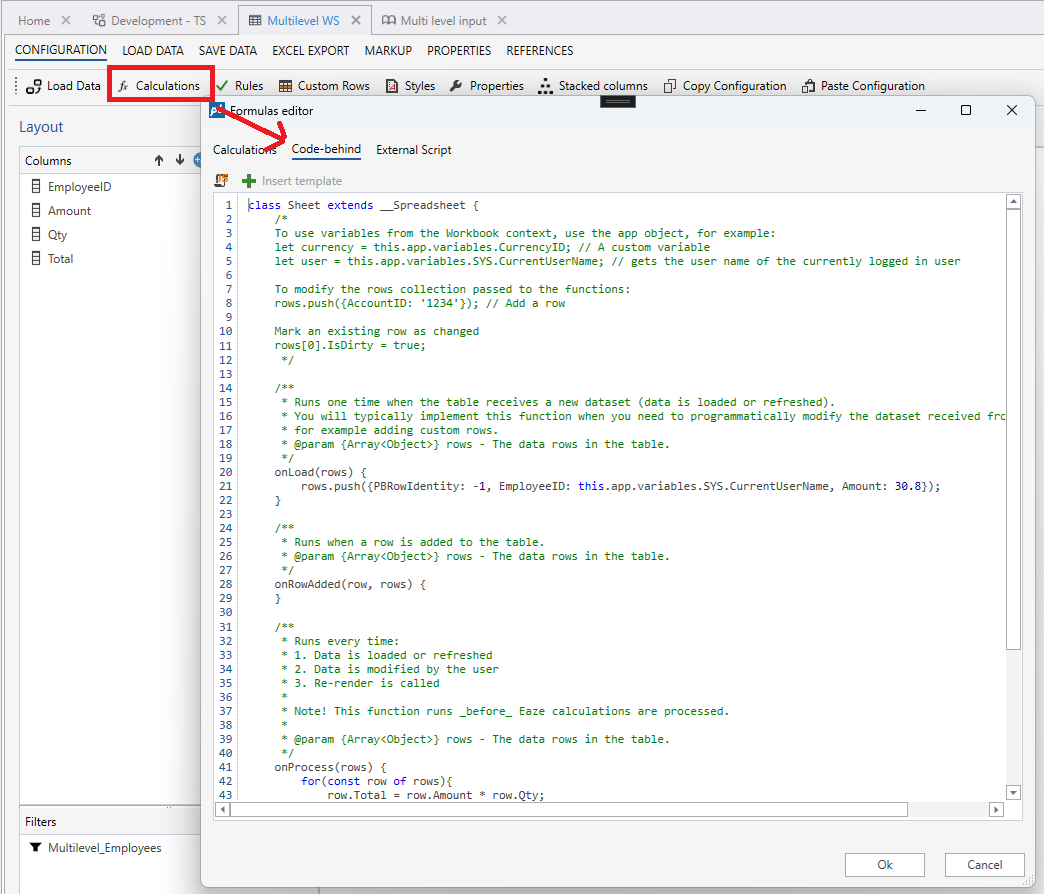
Functions
| Name | Description |
|---|---|
| onLoad(rows) | Runs when the table receives a new dataset from the Load Data action. This function runs only once pr Load Data action, so you can use it to modify the data set before it is rendered. A typical use case is to insert custom rows not returned from the server (such as custom summary rows). |
| onProcess (rows) | This is the main method which runs: 1. The data is loaded (after onLoad). 2. When data is modified by the user. 3. When the Recalc action is called. |
| onRowAdded(row, rows) | Runs when a new row is added to the table. Typically used for setting default values. |
| afterCalculate(rows) | Runs after Eaze calculations and onProcess(...). You only need to implement this function for advanced scenarios where you need to post-process rows after Eaze calculations. |
Inserting custom rows
To insert custom rows that should not be saved to the database, implement the onLoad(...) function and add rows to the rows collection with the IsCustomRow property set to true.
class Sheet extends __Spreadsheet {
    /**
     * Runs one time when the table receives a new dataset (data is loaded or refreshed).
     * You will typically implement this function when you need to programmatically modify the dataset received from the server,
     * for example adding custom rows.
     * @param {Array<Object>} rows - The data rows in the table.
     */
    onLoad(rows) {
    	rows.push({PBRowIdentity: -1, IsCustomRow: true, EmployeeID: this.app.variables.SYS.CurrentUserName, Amount: 30.8});
    }

    // ...rest
};
Accessing Workbook variables
To access Workbook variables in a code-behind function, use the this.app.variables API.
It provides access to both custom and system variables.
class Sheet extends __Spreadsheet {
    /**
     * Runs one time when the table receives a new dataset (data is loaded or refreshed).
     * You will typically implement this function when you need to programmatically modify the dataset received from the server,
     * for example adding custom rows.
     * @param {Array<Object>} rows - The data rows in the table.
     */
    onLoad(rows) {
    	rows.push({PBRowIdentity: -1, IsCustomRow: true, EmployeeID: this.app.variables.SYS.CurrentUserName, Amount: 30.8});
    }

    onProcess(rows) {
        // Calculates the Total by using the custom Workbook variable 'BonusPct'.
        for(const row of rows){
            row.Total = row.Amount * (1 + this.app.variables.BonucPct / 100);
        }
    }

    // ...rest
};