Text splitter
Defines a Text splitter object that can be used in various AI-related nodes with a "Text splitter" port.
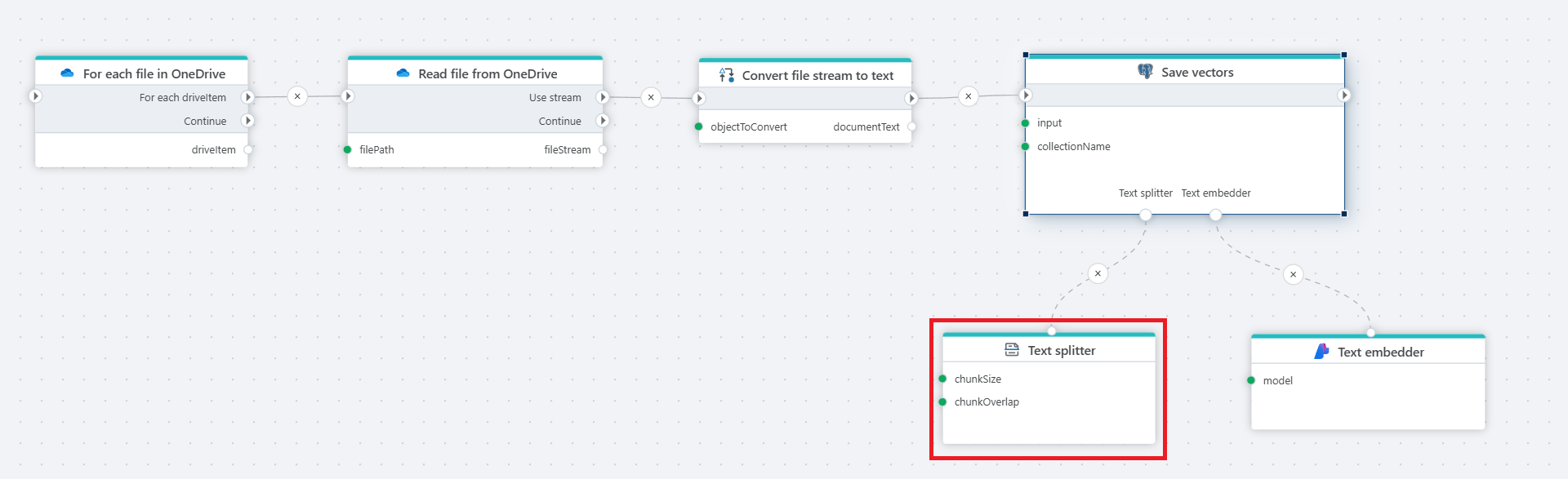
Example 
This flow reads files from OneDrive, converts their content to text, splits it into chunks, generates embedding vectors, and stores them in a PostgreSQL database for semantic search.
Properties
| Name | Required | Description |
|---|---|---|
| Name | No | The name of the action or operation. |
| Splitter type | Yes | Read documentation below.  |
| Result variable name | No | Contains the TextSplitter object created by this node. |
| Description | No | User-defined explanation or context for the node’s purpose. |
Splitter type
Required. Allows selection of a splitting type (algorithm). Based on the selected type, a number of additional properties will be shown.
Recursive character text splitter:
Splits text by characters into chunks of a specified size, optionally allowing overlap for better context retention.
Additional properties
| Name | Required | Description |
|---|---|---|
| Chunk size | Yes | The number of characters to split after. |
| Chunk overlap | No | The number of common characters in two consecutive chunks. |
Token text spiltter:
Divides text based on token count using a chosen encoding, useful for models with token limits.
Additional properties
| Name | Required | Description |
|---|---|---|
| EncodingName | No | The encoder that will count the tokens. |
| Max tokens | Yes | The maximum number of tokens in a chunk. |
| Chunk overlap | No | The number of common tokens in two consecutive chunks. |
Markdown header text splitter:
Breaks down documents at specific Markdown headers, ideal for structured texts like articles or reports.
Additional properties
| Name | Required | Description |
|---|---|---|
| Headers to split on | No | The markdown headers to split on. |
| Include header | No | Denotes if the headers themselves should be included in the output. |
Returns
Text splitter – Contains the TextSplitter object created by this node.