Create Azure AI connection
This action creates an Azure AI connection that can be used by Azure AI actions during Flow execution.
It allows you to dynamically provide the API key and endpoint at runtime instead of relying on a predefined connection. The connection returned from this action can be used as input to the Dynamic connection property in Azure AI request actions.
A typical use case is when you want a reusable Flows, but each customer needs separate AI model subscriptions in Microsoft Foundry so quotas (token usage), billing and other options can be managed individually.
Example 
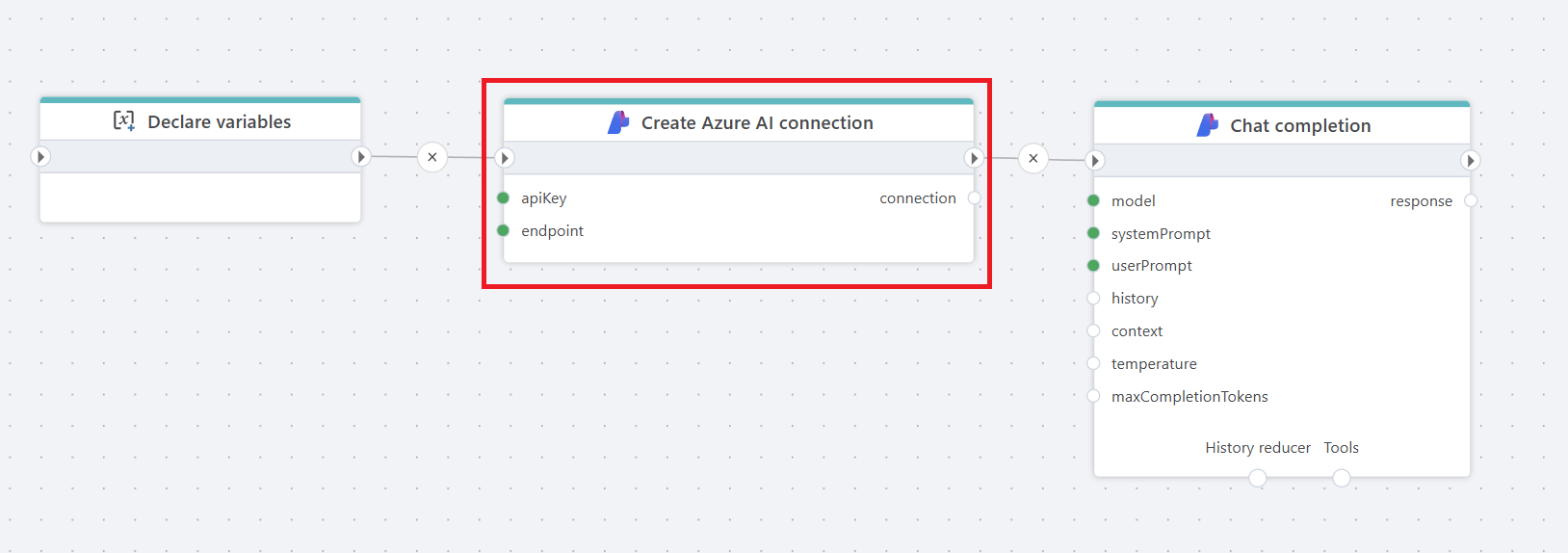
This flow prepares an Azure AI connection at runtime and then uses it to generate a chat completion.
It starts by declaring variables that likely contain the API key and endpoint. Those values are passed into Create Azure AI connection, which builds a connection object during execution. That connection is then used by the Chat completion action.
The Chat completion node sends a prompt to the selected Azure AI model and returns the generated response. In short, the flow dynamically creates the Azure AI connection and immediately uses it to execute a chat request.
A dynamic connection created by this action overrides the static Connection configured directly on an Azure AI action.
If credentials are stored outside Flow, for example in Azure SQL, PostgreSQL, or another secure store, this action can be used to create the Azure AI connection during execution.
Properties
| Name | Required | Description |
|---|---|---|
| Title | No | A descriptive title for the action. |
| API key | Yes | The API key used to authenticate against the Azure AI resource. |
| Endpoint | Yes | The endpoint URL of the Azure AI resource. |
| Connection variable name | Yes | The variable name that will store the created connection object. This variable can be passed to Azure AI actions as a dynamic connection. |
| Description | No | Additional notes about the action. |