Insert entity
Inserts a single row into a SQL Server table using data from a typed entity object. Each property on the entity maps to a column in the target table by name.
Use this when you have a typed entity — for example, created by a Function action — and want to insert it as a new row.
Logically, this action performs:
INSERT INTO tableName (Property1, Property2) VALUES(entity.Property1, entity.Property2)
Note
Each property name on the entity must match a column in the target table. If the database collation is case-sensitive, property names and column names must also match by case.
When to use this
- To insert a single typed entity created by a Function action or received from an upstream action.
- To save records from an Excel import where each row is mapped to an entity before insertion.
- When you have a structured object and want a clean insert without writing SQL.
Tip
To insert or update based on whether the row already exists, use Insert or Update Row instead. To insert many rows in bulk, use Insert Rows.
How it works
- Input: A typed entity object and the name of the target table.
- Processing: Maps each property on the entity to a column in the target table by name and inserts a new row with those values.
- Output: Optionally stores the number of rows affected in a Flow variable specified by Result variable name.
Example 
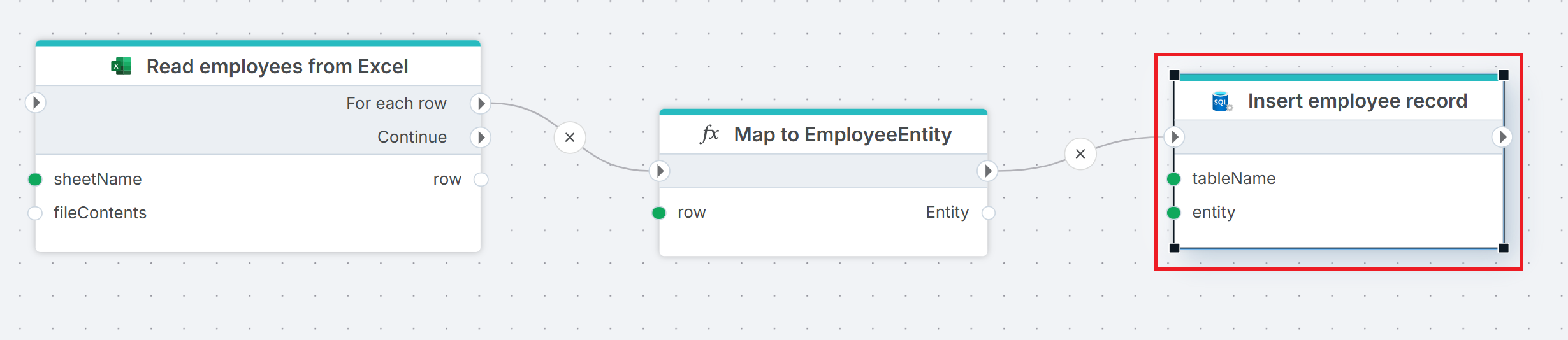
This flow reads employee data from an Excel file and iterates over rows in the spreadsheet. For each row, Map to EmployeeEntity creates a typed entity from the row data. Insert employee record then inserts the entity as a new row in the target table. Use this pattern when source data needs transformation before insertion — the Function action shapes the data into an entity, and Insert entity writes it to the database.
Properties
| Name | Required | Description |
|---|---|---|
| Title | No | A descriptive title for the action. |
| Connection | Yes | The SQL Server Connection to the target database. |
| Enable dynamic connection | No | When enabled, uses a connection created at runtime by Create Connection. Use this when the target database varies between runs. |
| Entity | Yes | The entity object to insert. Select from available Flow variables — typically an entity created by a Function or Get Entity action. |
| Table name | Yes | The name of the table to insert the row into. |
| Result variable name | No | The name of a Flow variable that receives the number of rows affected. |
| Command timeout (seconds) | No | Maximum execution time in seconds. The action fails with a timeout error if exceeded. Default is 120 seconds. |
| Disabled | No | When checked, the action is skipped during Flow execution. |
| Description | No | Additional notes or comments about the action or configuration. |
Returns
Int32. The number of rows affected (typically 1 for a successful insert). If Result variable name is set, the value is stored in the specified Flow variable.
See also
- Update Entity — updates an existing row from a typed entity object.
- Insert or Update Row — upserts a single row based on key match.
- Insert Rows — bulk-inserts rows from a DataReader or DataTable.
- Get Entity — retrieves a single entity from a query.
- Connection — how to set up a SQL Server connection.
SQL Server: Videos / Getting started
This section contains videos to help you get started quickly working with Azure SQL / SQL Server using Flow.
Dump CSV file from Azure Blob container to Azure SQL table
This video demonstrates how to import all records from a CSV file into an Azure SQL table.
In the demo, no data import options (such as data type conversion, number or date formatting) are specified, meaning the data is imported as raw text.