Update entity
Updates a table in SQL Server using data from an entity.
At least one Update key is required. If you don't specify an Update key, the action will fail.
Logically, this action performs the following:
UPDATE tableName
SET tableName.X = entity.X, tableName.Y = entity.Y
WHERE tableName.Key1 = entity.Key1 AND tableName.Key2 = entity.Key1
All properties in the Update keys configuration will be used in the WHERE clause to identify which row to update.
All properties NOT in the Update keys configuration will be used in the SET clause to identity which columns to update with data from the entity.
Note
Each property name in the entity must exist in the target table. If the database collation is case sensitive, the properties and columns must match by case in addition to name.
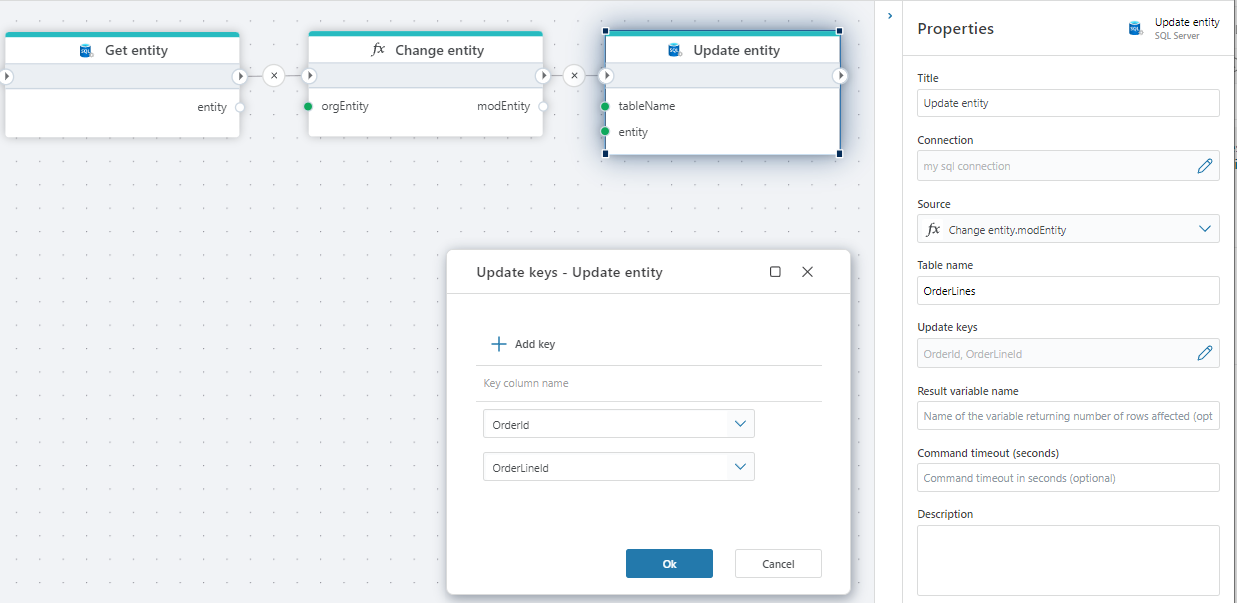
Properties
| Name | Type | Description |
|---|---|---|
| Title | No | A descriptive title for the action. |
| Connection | Yes | The SQL Server Connection. |
| Dynamic connection | No | Use this option if you need to use a connection created by the Create Connection action. |
| Source | Yes | Select the entity to use in update. |
| Table name | Yes | Select or enter the table name to insert into. |
| Update key | Yes | Select the table columns to use for update keys. |
| Result variable name | No | Name of resulting list of entities variable |
| Command timeout (sec) | No | The time limit for command execution before it times out. Default is 120 seconds. |
| Description | No | Additional notes or comments about the action or configuration. |
SQL Server: Videos / Getting started
This section contains videos to help you get started quickly working with Azure SQL / SQL Server using Flow.
Dump CSV file from Azure Blob container to Azure SQL table
This video demonstrates how to import all records from a CSV file into an Azure SQL table.
In the demo, no data import options (such as data type conversion, number or date formatting) are specified, meaning the data is imported as raw text.