Load DeltaTable
This action compares a source table with a target table and detects inserted, updated, and deleted rows. The differences are stored in a DeltaTable that contains the mapped columns and a row state column named __rowState. The row state column indicates whether a row in the source table is inserted, updated or deleted relative to the target table. The DeltaTable can then be used to update the target table by applying only the changed rows.
If Incremental Historic mode is selected, the DeltaTable will contain multiple change sets grouped by a Batch number that is incremented per load.

Example 
This flow example shows a process that loads a DeltaTable by comparing a source and target table. The source table, for example, is updated by loading transactions using the Load SIE file originating from an ERP system, and then inserting results. After the DeltaTable is loaded, a message is sent using the RabbitMQ publish message action.
Properties
| Name | Type | Description |
|---|---|---|
| Title | No | A descriptive title for the action. |
| Connection | Yes | The SQL Server Connection. |
| Dynamic connection | No | Use this option if you need to use a connection created by the Create Connection action. |
| Source table name | Yes | Source table name to load from. |
| Delta table name | Yes | Delta table to fill with changes. Flow automatically creates this table. |
| Target table name | Yes | Target table to compare against. |
| Columns and load settings | Yes | List of columns to use in DeltaTable, and settings for historical mode. See below for details. |
| Result variable name | No | The name of the variable returning the number of rows in the DeltaTable. |
| Command timeout (sec) | No | The time limit for command execution before it times out. Default is 120 seconds. |
| Description | No | Additional notes or comments about the action or configuration. |
Returns
Returns the number of new rows loaded to the DeltaTable.
How to use
The purpose of this action is to update a target table with changes from a source table using the minimum number of row operations (only rows that have been inserted, updated, or deleted are affected).
Specify the source table.
This table is typically populated by another process, such as a data import from an ERP system. It represents the current state of the source system.Specify the target table.
The target table represents the state of the target system. Flow uses this table together with the source table to determine the differences and populate the DeltaTable.Specify the DeltaTable.
This table contains the differences between the source and target tables — which rows in the source have been inserted (new), updated, or deleted relative to the target table since the last synchronization.
Flow will take ownership of the table and create or update it as needed.Configure the Column Settings
Specify which columns from the source should be included in the DeltaTable.- Add all columns that should be synchronized from source to target.
- Select the Key columns (1 or more columns that make the row unique).
- Select the column(s) used for comparison.
For performance reasons, choose as few columns as possible while still ensuring that rows can be uniquely identified (keys), and changes detected (comparison).
Incremental history mode
When checked, the DeltaTable will contain multiple loads (separated with a __batchNo column incremented for each load). To limit the size of the DeltaTable, set the Days To Keep value so that older rows will be deleted.
When not checked, the DeltaTable will be truncated before each load.Keep the target table synchronized
If you are using Flow to build a staging database, make sure that the target table is also kept in sync with the final destination. Otherwise, the DeltaTable may be calculated incorrectly the next time the Flow runs.
When the Update target table is checked, it will be merged with the DeltaTable. Otherwise, do it with other SQL Server actions.
Column Settings
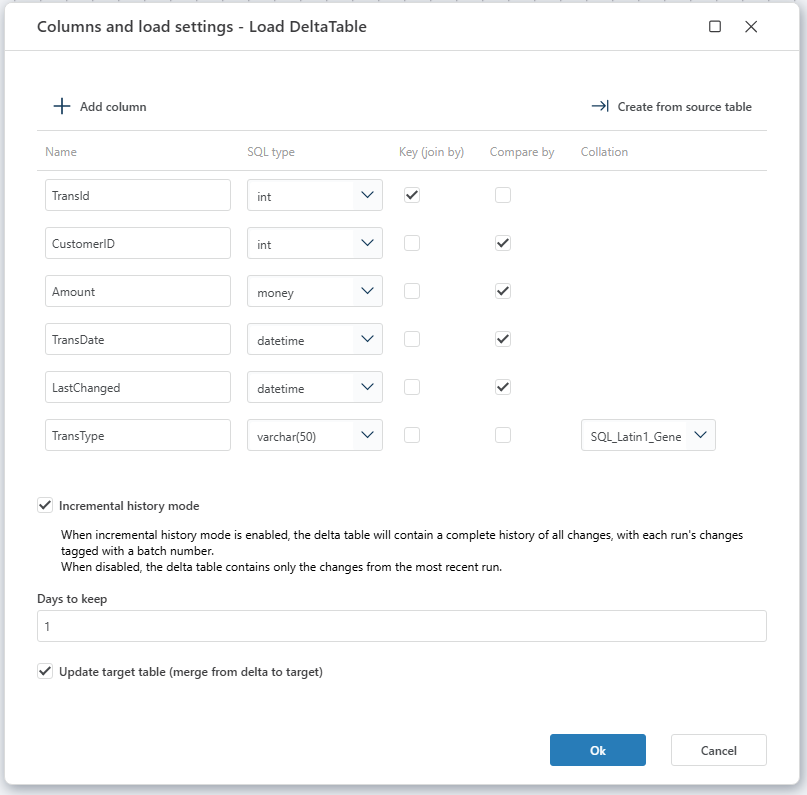
To use the columns from the Source Table, click on Create from source table. You can also define columns manually by using Add. The columns defined in the list will be added to the DeltaTable.
| Property | Description |
|---|---|
| Name | Name of the column to include. |
| SQL Type | SQL Data Type name |
| Key (join by) | One or more key columns that make the row unique (will be used in SQL join) |
| Compare by | If the column is included in comparison between source and target (using hashing). |
| Collation | If the collation is different between source and target, the collation is used in comparison and in DeltaTable. |
System columns added to the DeltaTable
| Column | Type | Description |
|---|---|---|
| __rowState | tinyint | The Row State column specifies which action to apply when updating the target table. See values in table below. |
| __batchNo | int | The Batch Number column contains an incremented value per load. This column only exists when using Incremental history mode. |
| __batchDate | DateTime | The Batch Date column contains a load date, and it is used for deletion. This column only exists when using Incremental history mode. |
Row State
The DeltaTable contains a column __rowState (of type tinyint) that indicates which action to apply when updating the target table.
| Value | Description |
|---|---|
| 1 | Row should be Inserted to the target table. |
| 2 | Row should be Updated in the target table. |
| 4 | Row should be Deleted from the target table. |
Details / Notes
In order to compare source and target tables, each table will be scanned (once) to detect differences. Large tables may affect overall performance of the operation.
The following notes and recommendations apply:
- If no Keys are checked, all columns will be used in join.
- If no Compare by are checked, all columns are used for comparison.
- If no unique column combinations exist for keys, the DeltaTable will only contain Deletes and Inserts. Important: Delete rows before inserting new rows.
- Avoid use of collation if possible; collation casting costs resources and increases time spent.
- If collation is not specified, collation differences are detected and handled.
- SQL Server Extended table properties are used to store the current BatchNo and BatchDate (for incremental history mode).