Add sheet to Excel workbook
Adds a sheet to an Excel workbook from a DataTable or DataReader. Each sheet has its own column mapping and formatting, so sheets in the same workbook can have completely different structures. Use the action several times, or inside a loop, to build a workbook with multiple sheets.
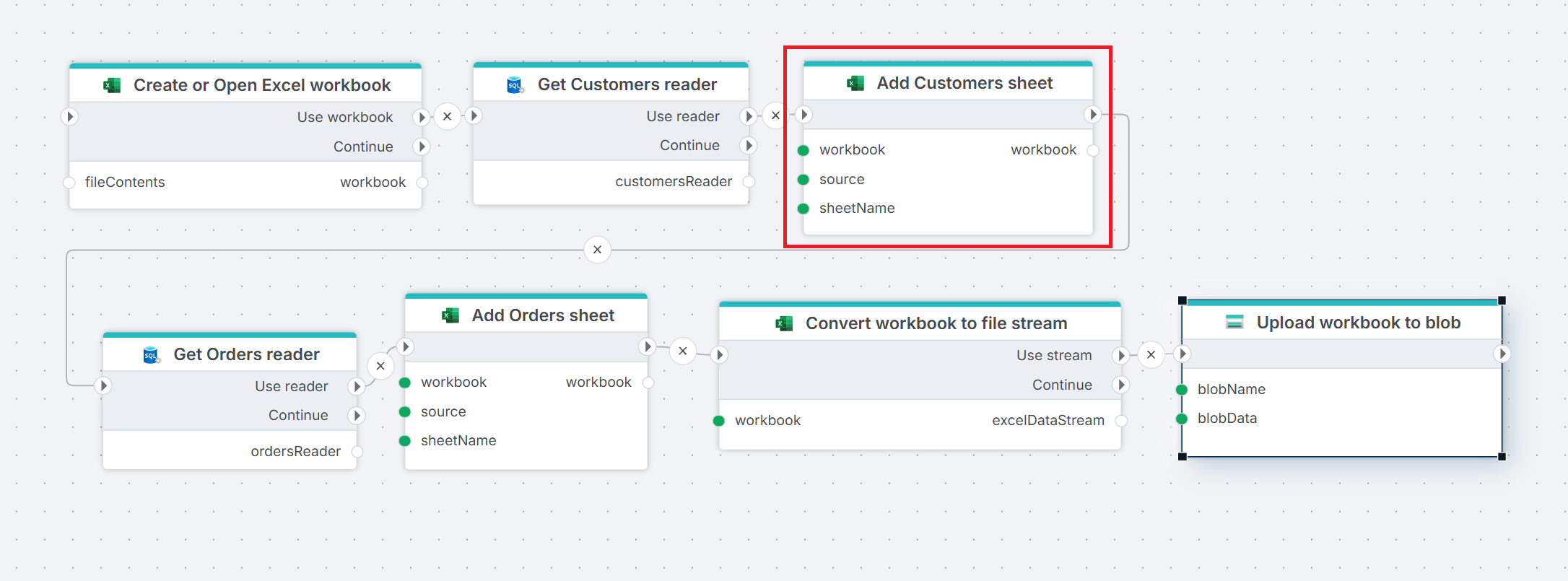
Example 
This Flow exports customers and orders from SQL Server to one Excel file with two sheets. Create or Open Excel workbook creates an empty workbook, and Get Customers reader (Get DataReader) runs in its Use workbook branch. Add Customers sheet takes the workbook, uses customersReader as source, and sets sheetName to name the new sheet. The workbook output is then passed to Add Orders sheet, which adds a second sheet from ordersReader with its own column mapping and formatting. After both sheets are added, Convert workbook to file stream (Convert Excel workbook to file stream) produces the file, and Upload workbook to blob (Upload Blob) saves it to Azure Blob Storage.
Properties
| Name | Required | Description |
|---|---|---|
| Title | No | The title of the action. |
| Workbook | No | The workbook to add the sheet to, typically the output of Create or Open Excel workbook. If omitted, a new workbook is created. |
| Source | Yes | Specifies the source of the data, which can either be a DataTable or DataReader. |
| Sheet name | No | The name of the new sheet. If omitted, the first available name in the sequence Sheet 1, Sheet 2, etc. is used. See Sheet names. |
| Column mapping | No | Defines the mapping between Excel column letters and source column names for this sheet. If no mapping is defined, all columns from the source are exported. |
| Worksheet formatting options | No | Specifies detailed formatting options for this sheet. |
| Workbook variable name | No | The name of the variable you can use to reference the workbook in other actions. |
| Disabled | No | When checked, the action is skipped during Flow execution. |
| Description | No | Additional notes or comments about the action or configuration. |
Returns
The Excel workbook with the new sheet added. If Workbook was provided, this is the same workbook. If Workbook was omitted, this is a new workbook.
Sheet names
Sheet names are adjusted automatically to be valid in Excel:
- Characters that are not allowed in Excel sheet names are replaced.
- Names longer than 31 characters are truncated.
- If a sheet with the same name already exists (case-insensitive), a suffix such as
(2)is added.
Remarks
- New sheets are always added after the existing sheets in the workbook. Existing sheets are never overwritten.
- If the source contains no rows, a sheet with only the header row is created. A source with no columns causes an error.
- When using a DataReader, all rows are read immediately, but the DataReader is not closed by this action.
- When using the output of Create or Open Excel workbook, run this action inside its Use workbook branch. Add all sheets before converting the workbook to a file — sheets cannot be added after conversion.
- Add sheets one after the other. Do not add sheets to the same workbook in parallel.
Automatic column mapping
Columns can be mapped automatically by using the "Map from sample file" option.

See also
- Create or Open Excel workbook — creates a new workbook or opens an existing Excel file.
- Convert Excel workbook to file bytes — converts the workbook to a byte array.
- Convert Excel workbook to file stream — converts the workbook to a stream.
Excel: Videos / Getting started
Send email with Microsoft 365 Outlook
This video shows how to export data to an Excel file, and send it as an email attachment using Microsoft 365 Outlook.