Convert Excel workbook to file stream
Converts an Excel workbook, with all its sheets, to an Excel file and returns it as a Stream. Use this action after all sheets have been added with Add sheet to Excel workbook.
Example 
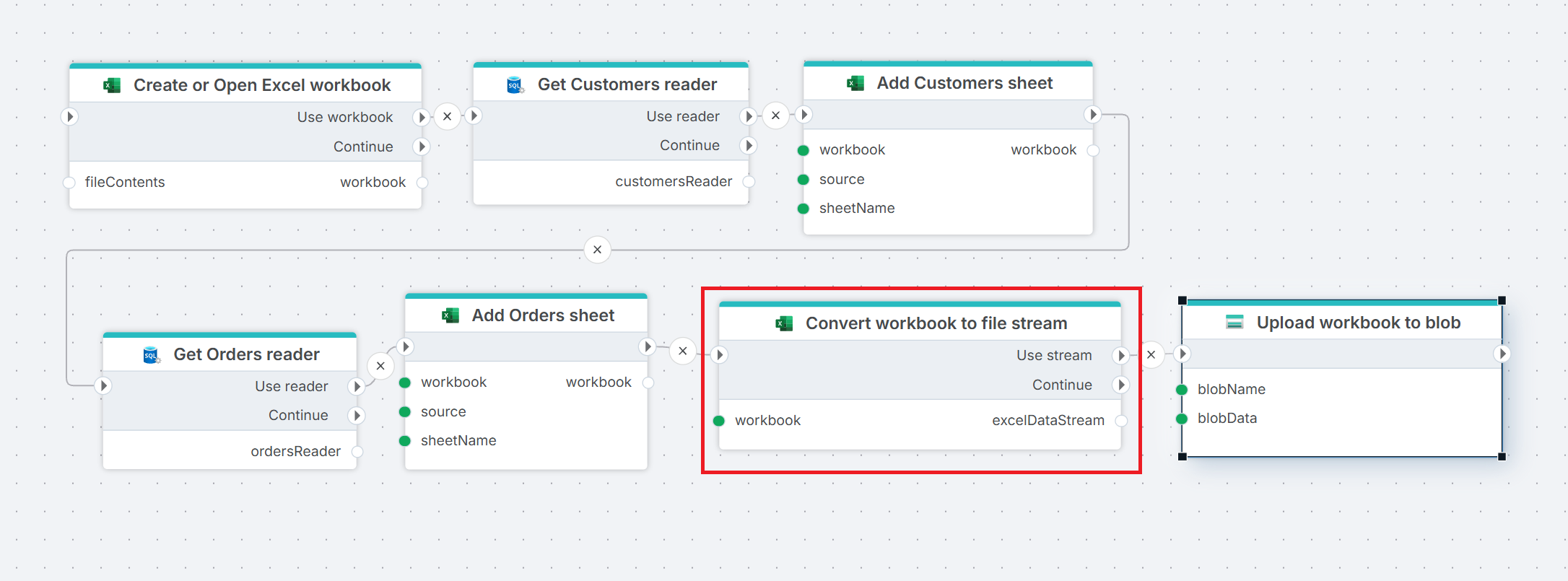
This Flow exports customers and orders from SQL Server to one Excel file with two sheets. Create or Open Excel workbook creates an empty workbook, and inside its Use workbook branch, Add Customers sheet and Add Orders sheet (Add sheet to Excel workbook) add one sheet each from SQL Server DataReaders (Get DataReader). Convert workbook to file stream takes the finished workbook and returns the file as excelDataStream. Upload workbook to blob (Upload Blob) is connected to the Use stream branch and uploads the stream to Azure Blob Storage as blobData. When the Use stream branch completes, the stream is closed automatically and the Flow continues from Continue.
Properties
| Name | Required | Description |
|---|---|---|
| Title | No | The title of the action. |
| Workbook | Yes | The workbook to convert, typically the output of Create or Open Excel workbook or Add sheet to Excel workbook. |
| Stream variable name | No | The name of the variable you can use to reference the Stream in other actions. |
| Disabled | No | When checked, the action is skipped during Flow execution. |
| Description | No | Additional notes or comments about the action or configuration. |
Returns
Returns the Excel file as a Stream, positioned at the beginning. The file is in .xlsx format, or .xlsm if the workbook was opened from a macro-enabled file.
Output ports
| Port | Description |
|---|---|
| Use stream | Runs while the stream is available. Connect uploads and other actions that read the stream here. |
| Continue | Runs after the Use stream branch has completed and the stream has been closed. |
Remarks
- Run this action inside the Use workbook branch of Create or Open Excel workbook, after all sheets have been added.
- The workbook must contain at least one sheet.
- The stream is closed automatically when the Use stream branch completes, also if an error occurs. Do not use the stream from the Continue port.
- After conversion, no more sheets can be added to the workbook. Converting the same workbook again is allowed.
- This action avoids the extra byte array copy made by Convert Excel workbook to file bytes, but both the workbook and the stream are kept in memory.
See also
- Create or Open Excel workbook — creates a new workbook or opens an existing Excel file.
- Add sheet to Excel workbook — appends a sheet from a DataTable or DataReader.
- Convert Excel workbook to file bytes — converts the workbook to a byte array.
Excel: Videos / Getting started
Send email with Microsoft 365 Outlook
This video shows how to export data to an Excel file, and send it as an email attachment using Microsoft 365 Outlook.