Convert DataTable or DataReader to Excel file stream
Creates an Excel file from a DataTable or DataReader and returns the result as a Stream.
Tip
This action creates a file with a single sheet. To create a file with multiple sheets, or to add sheets to an existing Excel file, use Create or Open Excel workbook together with Add sheet to Excel workbook.
Example 
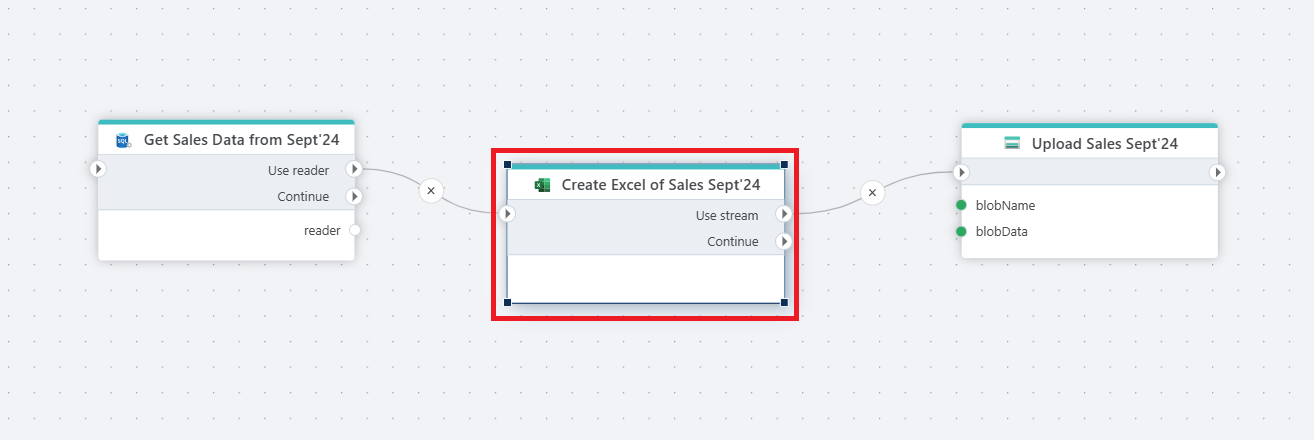
This Flow exports sales data for September 2024 and uploads it as an Excel file. It begins by retrieving the sales records using a database reader, then passes the resulting data into the Convert DataTable or DataReader to Excel file stream action, which generates an Excel file as a stream. The stream is then sent to the Upload Sales Sept’24 action, where it is saved to storage under the specified blob name. This pattern is useful for automating scheduled reports, monthly data exports, and delivering Excel files to downstream systems or users.
Properties
| Name | Required | Description |
|---|---|---|
| Title | No | The title of the action. |
| Source | Yes | Specifies the source of the data, which can either be a DataTable or DataReader. |
| Sheet name | No | Specifies a worksheet name. |
| Column mapping | No | Defines the mapping between Excel column letters and business object property names. |
| Worksheet formatting options | No | Specifies detailed formatting options. |
| Stream variable name | No | The name of the variable you can use to reference the Stream in other actions. |
| Disabled | No | When checked, the action is skipped during Flow execution. |
| Description | No | Additional notes or comments about the action or configuration. |
Returns
Returns the Excel file as a Stream
Output ports
| Port | Description |
|---|---|
| Use stream | Runs while the stream is available. Connect uploads and other actions that read the stream here. |
| Continue | Runs after the Use stream branch has completed and the stream has been closed. |
Automatic column mapping
Columns can be mapped automatically by using the "Map from sample file" option.

Excel: Videos / Getting started
Send email with Microsoft 365 Outlook
This video shows how to export data to an Excel file, and send it as an email attachment using Microsoft 365 Outlook.